
Fonts
Every text needs a font, and your application brings its own. This page shows how to load a font family once, how a style picks one of its faces, and which kind of font to choose.
You will learn
- How to load a font family for the whole application
- How a style picks a face of the family
- How to load a font without blocking
- Which kind of font to choose: MSDF or bitmap
Load a font family
Section titled “Load a font family”MsdfFontLoader.load reads font files and builds one family, an MsdfFont, from them.
Pass every face you use, regular, bold, italic, in one call:
public final class AppFonts {
  public static final MsdfFont MONTSERRAT = MsdfFontLoader.load(    "fonts/Montserrat/Montserrat-Regular.ttf",    "fonts/Montserrat/Montserrat-Bold.ttf"  ).join();
  private AppFonts() {}
}The family works in any TextInfo style: TextInfo.create(AppFonts.MONTSERRAT, 32F) (Text).
Keep your fonts in one class, and load each family once, after the backend is registered (Run code once JOID is ready).
A static final field loads when its class is first used: use AppFonts only after register(), as the UIs do.
Each face is a .ttf or .otf file, or an .msdf atlas made in advance.
load(...) takes it as a path in the classpath or on the disk, a URL with its scheme, a File or an InputStream.
The first load of a font file generates an atlas, which takes a moment once; the next runs read it from the cache (What happens when a font loads).
Let a style pick a face
Section titled “Let a style pick a face”A family holds several faces, each with a weight and an italic flag read from its file. A style asks for a weight and a slant, and the family draws the face that matches:
final TextInfo regular = TextInfo.create(AppFonts.MONTSERRAT, 40F).color(TitleUI.TEXT);TextNode.create(50, 50).text(Text.create("Regular 400", regular)).attach(card);TextNode.create(50, 130).text(Text.create("Bold 700", regular.withWeight(FontWeight.BOLD))).attach(card);TextNode.create(50, 210).text(Text.create("Italic, slanted", regular.withItalic(true))).attach(card);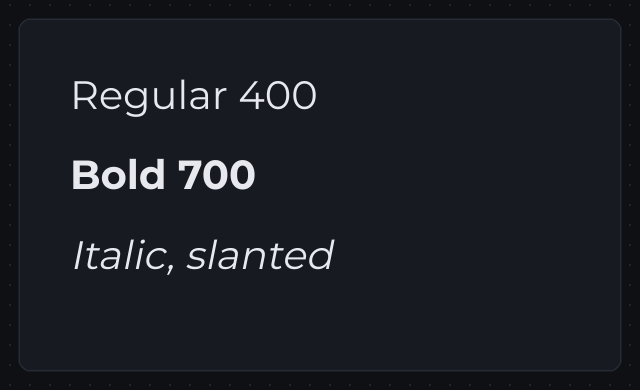
- When the family has no face of the weight you ask for, it draws the closest one, and dev mode prints a warning that names the missing weight and the loaded ones: load every weight you use.
italic(true)draws the italic face closest to the weight; a family without an italic face slants its upright face.- Two faces of the same weight and slant in one
load(...)call make the future fail with anIllegalArgumentException.
A face whose file declares the wrong weight can be given another one: Custom fonts and MSDF shows the MSDF sources that do it.
Load a font without blocking
Section titled “Load a font without blocking”load(...) reads the files in the background and returns a CompletableFuture.
join() waits for it, as in AppFonts above.
To keep the window responsive while a large font loads, react to the future instead:
final RectNode card = RectNode.create(660, 440, 600, 200).color(LoadingUI.SURFACE).effect(RoundedNodeEffect.create(12F)).effect(BorderNodeEffect.create(LoadingUI.ELEMENT, 1.5F)).attach(this);
MsdfFontLoader.load("fonts/Montserrat/Montserrat-Regular.ttf").thenAccept(font -> { TextNode .create(50, 70) .text(Text.create("Font ready", TextInfo.create(font, 40F).color(LoadingUI.TEXT))) .attach(card);});The UI opens at once with an empty card, and the text appears when the font is ready. JOID completes the future on the render thread, so the code that reacts to it may attach nodes, open and close UIs (Threads).
Choose MSDF or bitmap
Section titled “Choose MSDF or bitmap”JOID draws two kinds of fonts:
| MSDF font | Bitmap font | |
|---|---|---|
| Made from | A .ttf, .otf or .msdf file | Glyphs drawn on a pixel grid |
| At any size | Sharp, even scaled, zoomed or rotated | Drawn from its pixels: crisp at its own size, made for pixel art |
| Use it for | Every interface text | Pixel-art interfaces |
MsdfFontLoader loads an MSDF font, the right choice in almost every case.
A bitmap font is a BitmapFont that you write for your own glyphs: Custom fonts and MSDF shows how, and MSDF text explains how MSDF keeps the edges sharp.
- JOID ships no font for your application: load your own, once, after the backend is registered.
MsdfFontLoader.load(...)builds a family from every face you pass.- A style asks for a weight; the family draws the closest face, with a dev warning when it is missing, and slants an upright face for italic.
load(...)returns aCompletableFuture:join()waits,thenAcceptreacts on the render thread.- The first load of a font file generates its atlas once, then reads it from the cache.
- MSDF fonts stay sharp at every size; bitmap fonts are for pixel art.
Try it
Section titled “Try it”Add a weight.
AppFonts holds Regular and Bold.
A style asks for SEMI_BOLD (600): which face is drawn, and what does dev mode print?
Solution
The closest face, Bold (700), is drawn.
Dev mode prints once that the weight 600 is not loaded in the family, that 700 is drawn instead, and which weights are loaded.
Load the semi-bold file in the same load(...) call to draw it.
Fail visibly.
In LoadingUI, show a message in the card when the font does not load.
Solution
exceptionally runs when the future fails; give the message a font that is already loaded.
.exceptionally(error -> { TextNode.create(50, 70).text(Text.create("No font", TextInfo.create(AppFonts.MONTSERRAT, 40F))).attach(card); return null;});