
MSDF text
You need this page only if you want to know why JOID text stays sharp at any size, what happens the first time a font loads, or which characters a font can draw.
The problem with a picture of each letter
Section titled “The problem with a picture of each letter”A classic font texture stores a picture of each letter at one size. Scaled up, the letters turn blurry or blocky; scaled down, thin strokes vanish. JOID scales everything it draws with the window, the zoom and the interface scale, so the size of a letter on the screen changes all the time.
A distance field instead of a picture
Section titled “A distance field instead of a picture”MSDF stands for multi-channel signed distance field. Instead of the color of each texel, the atlas stores how far the texel is from the outline of the letter, inside or outside. Three color channels hold three distance fields, so the corners of the letters stay sharp instead of rounding off.
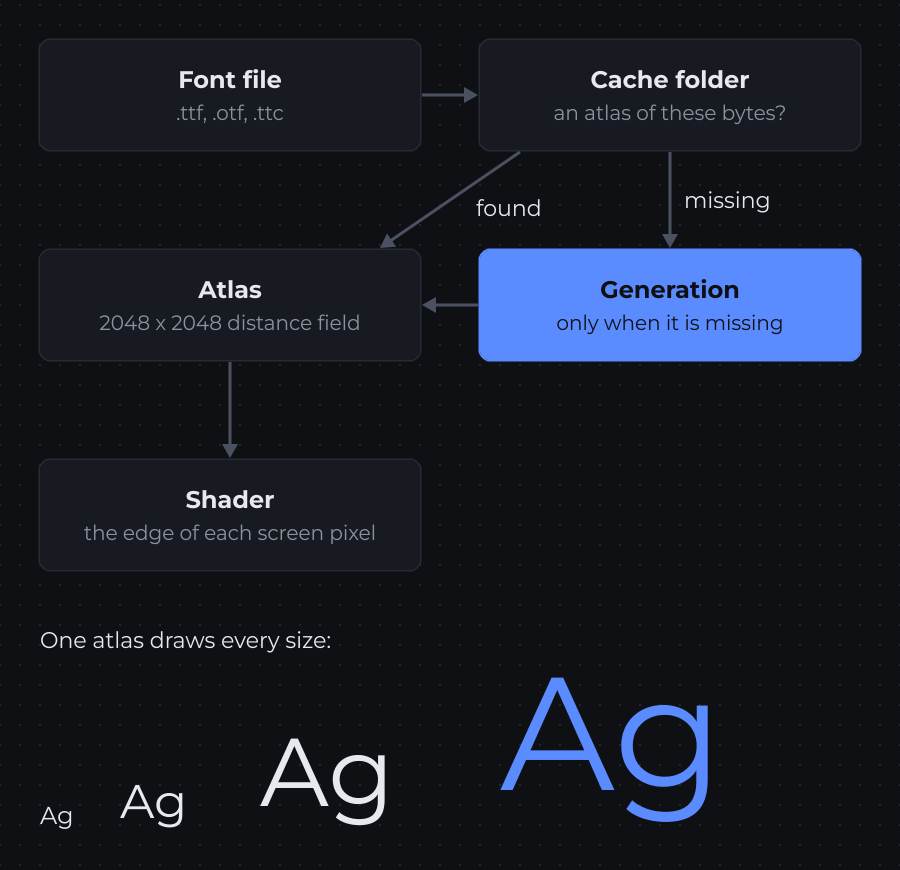
To draw a letter, the shader reads the three distances, keeps the median one, and turns it into the coverage of each screen pixel at the size the letter has right now. The edge is computed for the screen, not stored, so one atlas draws every size sharply.
What happens when a font loads
Section titled “What happens when a font loads”MsdfFontLoader.load reads each face on a thread of its own:
- Font file: JOID reads the bytes of the
.ttf,.otfor.ttcfile. - Cache folder: it looks for an atlas of these exact bytes in the
msdfarea of the cache folder. The name of the atlas also depends on the version of JOID and on the settings of the generator, so an update of JOID or of the font never reuses a stale atlas. - Generation, only when the atlas is missing: JOID generates it from the outlines of the font, with its kerning, and writes it to the cache folder. It writes a temporary file and moves it into place, so an interrupted generation never leaves a broken atlas; an atlas that cannot be read is generated again.
- Atlas: JOID reads the atlas and returns the face.
The future of load completes on the render thread once every face is ready.
The first launch on a machine pays for the generation, once per font file; every later load reads the cache.
In dev mode, JOID prints for each face whether it was generated or read from the cache, with the time it took.
A .msdf file made in advance by the MSDF generator (Custom fonts and MSDF) loads without any generation: give its path to load instead of the font file.
What the atlas holds
Section titled “What the atlas holds”Every generated atlas is 2048 × 2048 texels, with a distance range of 24 texels, and holds the characters from U+0020 to U+0233: Basic Latin, Latin-1, Latin Extended-A and most of Latin Extended-B (up to U+0233). A character outside this range has no glyph: JOID does not draw it and gives it no width. The MSDF generator builds atlases with other characters (Custom fonts and MSDF).
Each face of a family is a separate atlas, so a regular and a bold file make two atlases (Performance gives their GPU memory).
Small text
Section titled “Small text”At small sizes, a stroke can be thinner than a screen pixel. The shader reads the distance field four times per pixel, spread over the area that the pixel covers, so thin strokes keep their weight instead of turning dark and blotchy.
When the text is not rotated, JOID also rounds the height of the lowercase letters to whole pixels and puts the baseline on a pixel boundary (Pixel alignment).
What it means for your code
Section titled “What it means for your code”- Load the
.ttfor.otffiles of your font: Fonts shows how. - Expect the first run on a machine to take a few seconds more per face, and ship pre-generated
.msdffiles when that delay matters. - Check that every character of your texts lies between U+0020 and U+0233, or generate an atlas that holds them.
- For pixel-art letters at their exact pixel size, use a bitmap font (Fonts).