
How JOID works
With JOID, you describe an interface and JOID draws it. This page gives the few ideas behind that model, without code, so that every later page fits into a picture you already hold.
You will learn
- What a UI is, and how open UIs stack
- Why everything on screen is a node in a tree, and how a node lives
- Why you write every position for one fixed canvas
- How a value on screen follows your data
- Where JOID runs in your application, and what one frame does
Each interface is a UI
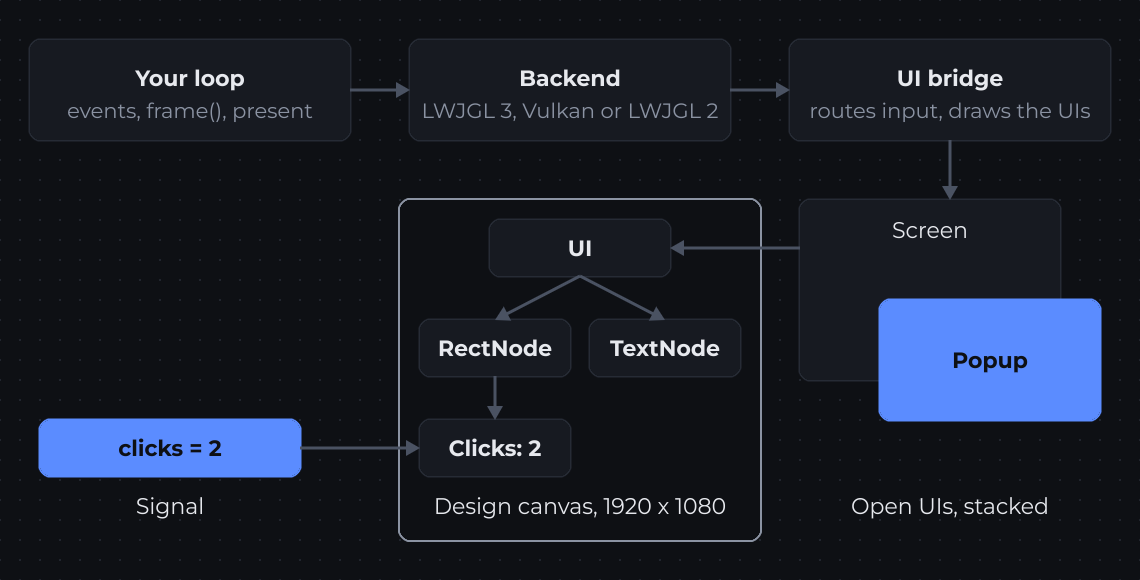
Section titled “Each interface is a UI”A UI is one interface of your application: a Java class that extends UI and builds its content in init() each time JOID.open opens it.
Several UIs can be open at once: a screen takes the window, a popup opens above another UI, and an overlay stays open while screens come and go (See how UIs stack).
Read UIs to write one and follow it from its opening to its closing.
A UI is a tree of nodes
Section titled “A UI is a tree of nodes”Everything a UI shows is a node, and you build an interface by nesting them: a button is a rectangle with a text inside. A child is placed relative to its parent, and moves, hides and leaves with it, from the moment it joins the UI until it is removed or the UI closes (Node lifecycle). Read Nodes and the tree to build a tree.
You design on one fixed canvas
Section titled “You design on one fixed canvas”Every position and size you write is in design pixels, on a canvas 1920 wide and 1080 high. JOID scales the whole canvas to the window, so you copy the coordinates of your mockup and the interface looks the same in a small window and on a 4K screen. Read The design canvas to see how the canvas fits windows of other shapes.
Values on screen follow signals
Section titled “Values on screen follow signals”A signal holds a value that changes, and a node property set from it shows the new value from the next frame: you change the data, never the nodes. When a value on screen does not update, ask one question: when does JOID compute this value again? Signals answers it for each form of setter.
JOID runs inside your application
Section titled “JOID runs inside your application”JOID never creates a window and never runs a loop: your application creates its window, hands it to a backend, and calls Backend.frame once per turn of its loop (Choosing a backend).
The backend reaches the window through bridges, and the UI bridge holds the open UIs, routes the input to them and draws them (Embedding JOID).
What one frame does
Section titled “What one frame does”Input reaches the open UIs, from the top one down, when your loop polls the window events; then frame() updates every open UI and its nodes, and draws them.
All of it, your listeners included, runs on the render thread (Threads).
The frame lifecycle lists every step.
- A UI is one interface, built in
init()at each opening; open UIs stack as screens, popups and overlays. - Everything on screen is a node; nodes nest into a node tree, and a child follows its parent.
- A node joins its UI when attached, updates and draws on every frame, and leaves when removed or when its UI closes.
- Every position and size is in design pixels on a 1920 × 1080 design canvas that JOID scales to the window.
- A node property set from a signal follows its value: change the data, not the nodes.
- Your application owns the window and the loop; the backend runs JOID in them, and the UI bridge holds, routes and draws the UIs.
- One frame updates everything, then draws everything, on the render thread.
Try it
Section titled “Try it”Name the UIs. A settings panel opens above the main menu, and the menu stays visible around it. Which two UIs are open, and of which kinds?
Solution
The main menu is a screen, and the settings panel is a popup opened above it.
Shrink the window. A button sits at x = 1720 on the canvas, near its right edge. The user shrinks the window to half its width and half its height. Where is the button now?
Solution
Still near the right edge, at the same place relative to the rest of the interface: JOID scales the whole canvas, so every position keeps its proportion.
A frozen score.
A text shows a score held in an int field of the UI.
A click adds one to the field, and the text does not change.
Why?
Solution
The text reads no signal, so it is a plain value: JOID never computes it again. Hold the score in a signal and build the text from it, and the text follows each click.
Switch the backend. Your application moves from LWJGL 3 to Vulkan. Which of your UI classes change?
Solution
None of them. Only the startup code that creates the window and the backend changes: the UIs never name the backend.