
Overlays and popups
A screen fills the window, and opening another screen replaces it. Some UIs must open above a screen instead: a confirmation dialog, a status bar, a minimap. This page shows the two kinds of UI that do: popups and overlays.
You will learn
- How to open a popup above a screen and dim what is under it
- How to keep an overlay open while screens come and go
- How to let an overlay take the mouse and the keyboard
- How open UIs stack, and which one receives the input
Open a popup above a screen
Section titled “Open a popup above a screen”A popup is a UI annotated with UIDataPopup and active = true.
Without active = true, the annotation does nothing, and dev mode prints a warning.
@UIData(background = true)@UIDataPopup(active = true)public class ConfirmPopup extends UI {
  private static final Color TEXT      = new Color(231, 233, 238).lock();  private static final Color ELEMENT   = new Color(38, 43, 53).lock();  private static final Color SURFACE   = new Color(23, 26, 33).lock();  private static final Color ACCENT    = new Color(91, 140, 255).lock();  private static final Color ON_ACCENT = new Color(14, 16, 20).lock();
  @Override  public void init() {    final TextInfo title = TextInfo.create(ExampleFont.REGULAR, 32F).color(ConfirmPopup.TEXT);    final TextInfo cancel = TextInfo.create(ExampleFont.REGULAR, 26F).color(ConfirmPopup.TEXT);    final TextInfo quit = TextInfo.create(ExampleFont.REGULAR, 26F).color(ConfirmPopup.ON_ACCENT);
    RectNode    .create(710, 390, 500, 300)    .color(ConfirmPopup.SURFACE)    .effect(RoundedNodeEffect.create(12F))    .effect(BorderNodeEffect.create(ConfirmPopup.ELEMENT, 1.5F))    .body(card -> {      TextNode.create(250, 90).text(Text.create("Quit the game?", title)).anchor(Align.CENTER).attach(card);      RectNode      .create(50, 190, 180, 70)      .color(ConfirmPopup.ELEMENT)      .label(Text.create("Cancel", cancel))      .onClick(event -> JOID.close(this))      .attach(card);      RectNode      .create(270, 190, 180, 70)      .color(ConfirmPopup.ACCENT)      .label(Text.create("Quit", quit))      .onClick(event -> JOID.close(this))      .attach(card);    })    .attach(this);  }
}Open it like any UI, here from a button of the screen:
RectNode.create(860, 500, 200, 80).color(SettingsUI.ACCENT).label(Text.create("Quit", label)).onClick(event -> JOID.open(new ConfirmPopup())).attach(this);SettingsUI without closing it, and its UI backdrop dims the screen.
A popup differs from a screen in three ways:
- Opening it keeps the screen under it open.
- It is modal: every input stops at the popup, even where it has no node, so the screen under it receives nothing until it closes.
- It opens and closes with a transition, set by
transitionof@UIDataPopup(Transitions).
background = true of UIData adds the UI backdrop that dims the screen; without it, the screen stays visible as it is.
Escape closes the popup when it is closeable, like a screen.
Opening another screen closes the current screen with every popup open above it (UIs).
Make a modal popup builds a confirmation popup end to end.
Keep an overlay open across screens
Section titled “Keep an overlay open across screens”An overlay is a UI annotated with UIDataOverlay and active = true, which turns it on as for a popup:
@UIDataOverlay(active = true)public class StatusOverlay extends UI {
  private static final Color ACCENT = new Color(91, 140, 255).lock();
  @Override  public void init() {    RectNode.create(480, 160, 400, 40).color(StatusOverlay.ACCENT).attach(this);  }
}An overlay stays open when screens open and close, and Escape never closes it: JOID.close does.
By default, an overlay is drawn below the screens, as a layer of information under the menus, and receives no input: clicks and keys go to the screens.
StatusOverlay stays open while SettingsUI and MenuUI replace each other.
A UI cannot be both a popup and an overlay: JOID refuses to create it.
Draw an overlay above the screens and let it take input
Section titled “Draw an overlay above the screens and let it take input”render and interaction of @UIDataOverlay change both defaults:
@UIData(anchorX = Align.END, anchorY = Align.START)@UIDataOverlay(  active = true,  render = @UIDataOverlayRender(aboveScreens = true),  interaction = @UIDataOverlayInteraction(active = true))public class MinimapOverlay extends UI {
  private static final Color ELEMENT = new Color(38, 43, 53).lock();  private static final Color SURFACE = new Color(23, 26, 33).lock();  private static final Color ACCENT  = new Color(91, 140, 255).lock();
  private double zoom = 1D;
  @Override  public void init() {    RectNode    .create(1560, 40, 320, 320)    .color(MinimapOverlay.SURFACE)    .effect(RoundedNodeEffect.create(12F))    .effect(BorderNodeEffect.create(MinimapOverlay.ELEMENT, 1.5F))    .onClick(event -> this.zoom = this.zoom == 1D ? 2D : 1D)    .body(map -> {      CircleNode      .create(160, 160, 40)      .color(MinimapOverlay.ACCENT)      .width(() -> 40D * this.zoom)      .height(() -> 40D * this.zoom)      .anchor(Align.CENTER)      .attach(map);    })    .attach(this);  }
}
Full file: MinimapOverlay.java
UIDataOverlayRender sets how the overlay is drawn:
aboveScreens = truedraws it above the screens and the popups.always = truedraws it even when the UI bridge hides its overlays, as a host can do while it shows its own menus (Embedding JOID).
UIDataOverlayInteraction sets its input:
active = truesends it the input, in its place in the stack below.cancelClick,cancelScrollandcancelKeyboarddecide whether a click, a scroll or a key that the overlay consumes counts as consumed for the application that runs JOID; set one tofalseto let the host see that input too.
An input that no node of the overlay consumes goes on to the UIs below it.
See how UIs stack
Section titled “See how UIs stack”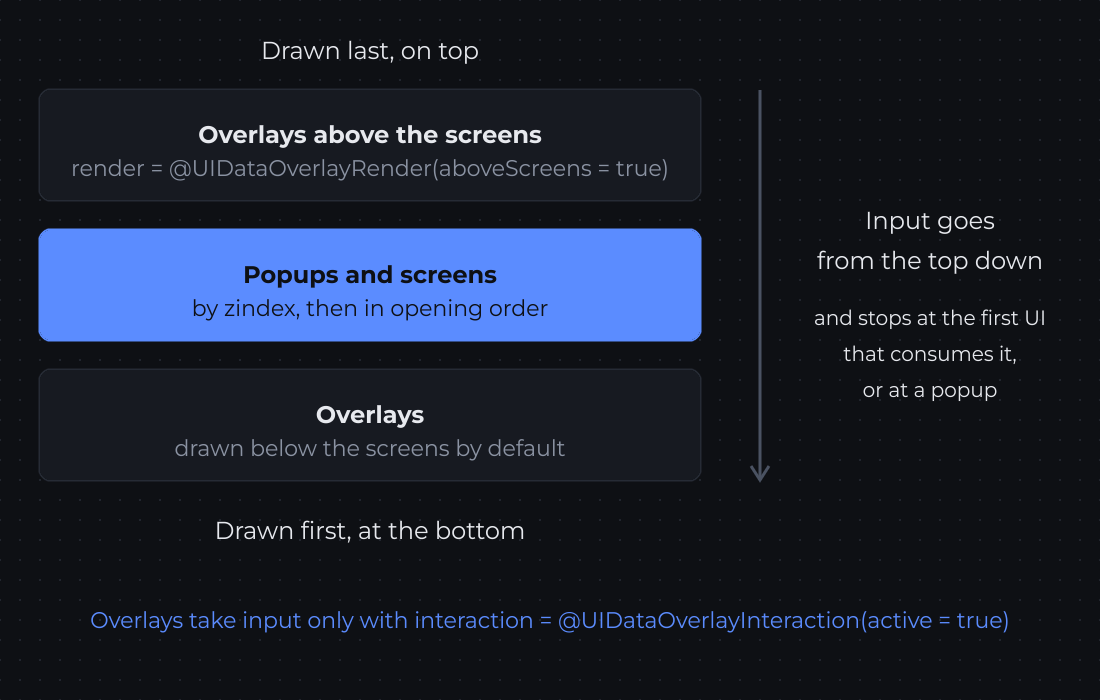
- JOID draws three groups, one above the other: the overlays, then the screens and popups, then the overlays with
aboveScreens = true. - Inside a group, the
zindexof@UIDataorders the UIs, the highest on top; UIs with the samezindexkeep their opening order, the last opened on top. - The input goes from the top UI down: it skips the UIs that are not
activeor notvisibleand the overlays without interaction, and it stops at the first UI that consumes it, or at a popup. - Opening a UI that is already open brings it to the top of its group.
UI.isOnTop tells whether a UI is the top one of its kind that receives input: the top screen or popup, or the top overlay with interaction.
With several UI bridges, each one stacks its own UIs, and the bridges stack by priority (Embedding JOID).
- A popup (
@UIDataPopup(active = true)) opens above the screen, keeps it open and is modal. @UIData(background = true)adds the UI backdrop that dims the screen under a popup.- An overlay (
@UIDataOverlay(active = true)) stays open across screens; Escape never closes it. - An overlay is drawn below the screens and takes no input by default;
renderandinteractionchange that. - UIs stack in three groups, then by
zindex, then by opening order; input goes from the top down.
Try it
Section titled “Try it”Let the status bar see the mouse.
Make the bar of StatusOverlay react to a click, while it stays below the screens.
Solution
Turn its interaction on and leave render as it is:
@UIDataOverlay(active = true, interaction = @UIDataOverlayInteraction(active = true))Drawn below the screens, it receives a click only where no screen consumed it before.
Open a popup over a popup.
Open a second popup from the Quit button of ConfirmPopup, and say which UI receives a click on the first one.
Solution
JOID.open(new ConfirmPopup()) in the onClick of the button opens it above the first one.
The input stops at the top popup, which is modal: the first popup receives nothing until the second one closes.