
UIs
Every interface you build with JOID is a UI: a menu, a settings panel, a dialog. This page shows how to write one, how it opens and closes, and how to configure it.
You will learn
- How to write a UI and build its nodes in
init() - How to open and close a UI, and what happens in between
- How to keep a UI open while it has unsaved work
- How opening a screen replaces the current one
- How to configure a UI with annotations
Write a UI
Section titled “Write a UI”A UI is a class that extends UI and builds its content in init():
public class MenuUI extends UI {
  private static final Color TEXT    = new Color(231, 233, 238).lock();  private static final Color ELEMENT = new Color(38, 43, 53).lock();  private static final Color SURFACE = new Color(23, 26, 33).lock();
  @Override  public void init() {    final TextInfo title = TextInfo.create(ExampleFont.REGULAR, 40F).color(MenuUI.TEXT);
    RectNode    .create(760, 340, 400, 400)    .color(MenuUI.SURFACE)    .effect(RoundedNodeEffect.create(12F))    .effect(BorderNodeEffect.create(MenuUI.ELEMENT, 1.5F))    .body(card -> {      TextNode.create(200, 70).text(Text.create("Menu", title)).anchor(Align.CENTER).attach(card);      RectNode.create(50, 130, 300, 70).color(MenuUI.ELEMENT).attach(card);      RectNode.create(50, 220, 300, 70).color(MenuUI.ELEMENT).attach(card);      RectNode.create(50, 310, 300, 70).color(MenuUI.ELEMENT).attach(card);    })    .attach(this);  }
}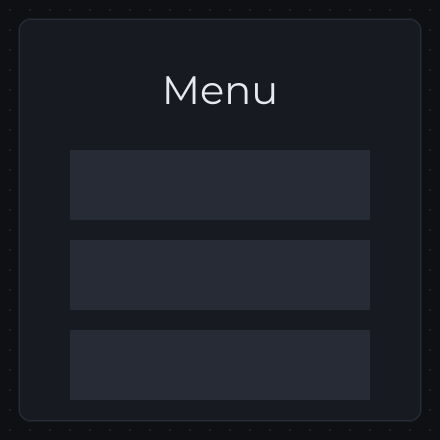
MenuUI on screen: everything a UI shows is a node that init() creates.
init() creates nodes and attaches them to the UI with attach(this).
Positions and sizes are design pixels on a 1920 × 1080 canvas, whatever the size of the window: The design canvas explains the scaling, and Nodes and the tree explains the nodes.
UI has no abstract method.
You override the hooks you need: UI.init builds the content, UI.update runs code on every frame, before the nodes are drawn.
A UI also holds input listeners (Events), shortcuts (Keyboard and shortcuts), tasks (Tasks and background updates) and stores (Stores and remembered properties).
Open and close a UI
Section titled “Open and close a UI”Open a UI with JOID.open:
JOID.open(new MenuUI());Close it with JOID.close, or let the user press Escape.
JOID.getUi returns the open UI of a class, or null when none is open:
final MenuUI menu = JOID.getUi(MenuUI.class);if (menu != null) { JOID.close(menu);}JOID.isOpen tells whether a UI is open: JOID.isOpen(ui) for an instance, JOID.isOpen(MenuUI.class) for any UI of that class.
You can call JOID.open and JOID.close from any thread: off the render thread, JOID runs them at the next frame (Threads).
A UI goes through these moments:
| Moment | What JOID does |
|---|---|
new MenuUI() | Runs the constructor and reads the annotations of the class. No node exists yet. |
JOID.open(ui) | Adds the UI, runs init(), then plays the opening transition if the UI has one. |
| Every frame | Calls update(), then draws the nodes. The input reaches the nodes as it comes. |
| The window resizes | Fits the canvas to the new size. init() does not run again. |
JOID.close(ui) or Escape | Asks the beforeClose listeners, plays the closing transition, detaches the nodes, saves the stores and properties of the UI, then fires onClose. |
init() runs at every opening, on the same instance: a UI that you close and open again starts from a fresh node tree, and its fields keep their values.
A listener, a task or a shortcut that you add in the constructor stays for the whole life of the instance; one that you add in init() lasts until the UI closes, and the next init() adds it again.
Escape closes the top UI when it is closeable and no node took the key (Keyboard and shortcuts). The opening and closing animations are transitions (Transitions).
Keep a UI open
Section titled “Keep a UI open”A UI.beforeClose listener that calls cancel() refuses the close.
It runs for JOID.close(ui) and for Escape:
private boolean saved;
@Overridepublic void init() {  this.saved = false;  super.beforeClose(event -> {    if (!this.saved) {      event.cancel();    }  });
  final TextInfo info = TextInfo.create(ExampleFont.REGULAR, 28F).color(EditorUI.ON_ACCENT);
RectNode .create(760, 340, 400, 400) .color(EditorUI.SURFACE) .effect(RoundedNodeEffect.create(12F)) .effect(BorderNodeEffect.create(EditorUI.ELEMENT, 1.5F)) .body(card -> { RectNode .create(100, 300, 200, 60) .color(EditorUI.ACCENT) .label(Text.create("Save", info)) .onClick(event -> this.saved = true) .attach(card); }) .attach(this);}The editor stays open until the user clicks the save button.
UI.onClose runs once the UI has closed, when you need to react to it.
JOID.forceClose closes a UI without asking the beforeClose listeners and without its closing transition, for example when the application quits.
JOID.forceOpen, the closeAll() of a UI bridge and the end of the program close the same way; every closing fires onClose (Close the UIs before the program ends).
Replace the current screen
Section titled “Replace the current screen”A UI that is neither an overlay nor a popup is a screen. Opening a screen closes the open screens first, with the popups open above them:
JOID.open(new MenuUI());JOID.open(new EditorUI());MenuUI replaces it.
When a UI that must close refuses, the new screen does not open; in dev mode, JOID prints a warning that names both UIs.
JOID.forceOpen closes every UI open in the UI bridge of the new one, without asking them, then opens it:
JOID.forceOpen(new MenuUI());Overlays and popups open above the current screen instead of replacing it, so several UIs can be open at once: Overlays and popups shows how they stack.
Rebuild an open UI
Section titled “Rebuild an open UI”This UI counts in a field how many times init() built it, and gives reload() and renew() a button each:
this.builds++;
TextNode.create(760, 420).text(Text.create("Builds: " + this.builds, info)).attach(this);
RectNode.create(760, 480, 190, 70).color(ReloadUI.ACCENT).label(Text.create("Reload", label)).onClick(event -> super.reload()).attach(this);
RectNode.create(970, 480, 190, 70).color(ReloadUI.ACCENT).label(Text.create("Renew", label)).onClick(event -> super.renew()).attach(this);UI.reload rebuilds an open UI on the same instance: it applies the values of the annotations that changed in the code since they were read, keeps the options that setters changed, then runs init() again, so its fields keep their values.
UI.renew starts from a fresh state instead: it replaces the open UI by a new instance of its class, built by its constructor without argument, and returns that instance.
In dev mode, shortcuts call each of them for you (Dev tools).
Configure a UI
Section titled “Configure a UI”Annotate the class with UIData to change how the UI behaves:
@UIData(background = true, closeable = false, zoomable = false)public class PauseUI extends UI {
  private static final Color ELEMENT = new Color(38, 43, 53).lock();  private static final Color SURFACE = new Color(23, 26, 33).lock();
  @Override  public void init() {    RectNode    .create(810, 390, 300, 300)    .color(PauseUI.SURFACE)    .effect(RoundedNodeEffect.create(12F))    .effect(BorderNodeEffect.create(PauseUI.ELEMENT, 1.5F))    .onClick(event -> super.getData().closeable(true))    .attach(this);  }
}The options of @UIData:
background = truedraws the UI backdrop over the whole window, behind the nodes of the UI, in the color ofbackgroundColor(a hexadecimal string, a dark veil by default).closeable = falsemakes Escape leave the UI open.JOID.closestill closes it.zoomable = falseturns off the zoom shortcuts of dev mode (The design canvas).active = falsekeeps the UI drawn but sends it no input.visible = falseneither draws the UI nor sends it input.anchorXandanchorYpin the canvas to a side or a corner of the window (The design canvas).zindexplaces the UI among the open UIs (Overlays and popups).projectionandzlevelmatter only when JOID draws inside the scene of a host application (Draw a UI inside your own projection).
Three more annotations configure a UI:
UIDataPopupmakes it a popup andUIDataOverlayan overlay (Overlays and popups); a UI cannot be both.UIDataScalecontrols how the interface scale applies to it (The design canvas).UIDataDebugturns off, for this UI, the profiler and the hot reload of dev mode (Dev tools).
The annotations are inherited: a subclass keeps the options of its parent class unless it declares the annotation again.
UI.getData returns the options of the running UI, and each setter changes them from then on.
UI.getPopup, UI.getOverlay, UI.getScale and UI.getDebug do the same for the other annotations.
In PauseUI, a click on the card makes the UI closeable, so Escape closes it from the next press.
- A UI extends
UIand builds its nodes ininit(), never in its constructor. JOID.open(ui)opens a UI and runsinit()at every opening;JOID.close(ui)and Escape close it.- A
beforeCloselistener that callscancel()keeps the UI open;JOID.forceCloseskips it. - Listeners added in the constructor last for the instance; those added in
init()last for one opening. - Opening a screen closes the open screens and their popups first; overlays and popups open above it.
reload()runsinit()again on the same instance;renew()replaces it by a fresh one.@UIDataconfigures the UI backdrop, Escape, zoom, input, visibility, anchors andzindex.
Try it
Section titled “Try it”Close with a button.
Add a fourth bar to MenuUI that closes the menu when clicked.
Solution
A click listener calls JOID.close(this) from inside the UI.
The card is 400 design pixels high: make it 500 high so that the bar fits.
RectNode.create(50, 400, 300, 70).color(MenuUI.ELEMENT).onClick(event -> JOID.close(this)).attach(card);Lock the menu.
Make Escape leave MenuUI open, while your button still closes it.
Solution
closeable = false concerns Escape only; JOID.close keeps working:
@UIData(closeable = false)public class MenuUI extends UI {Count the openings.
Show how many times MenuUI has been opened.
Solution
init() runs at every opening and the fields keep their values: increment a field in init(), then show it in a TextNode under the card:
this.openings++;final Text count = Text.create("Opened " + this.openings + " times", title);TextNode.create(960, 790).text(count).anchor(Align.CENTER).attach(this);