
Node lifecycle
A node joins a UI, lives there for many frames, then leaves. Listeners run your code at each of these moments: to start a counter when the node appears, to draw a decoration, to stop work when it goes.
You will learn
- Which moments a node goes through, in which order
- How to run code when a node joins its UI and on every frame
- How to know when a node is drawn for the first time
- How to draw around a node while it is drawn
- How to release what a node started when it leaves
Follow a node from attach to remove
Section titled “Follow a node from attach to remove”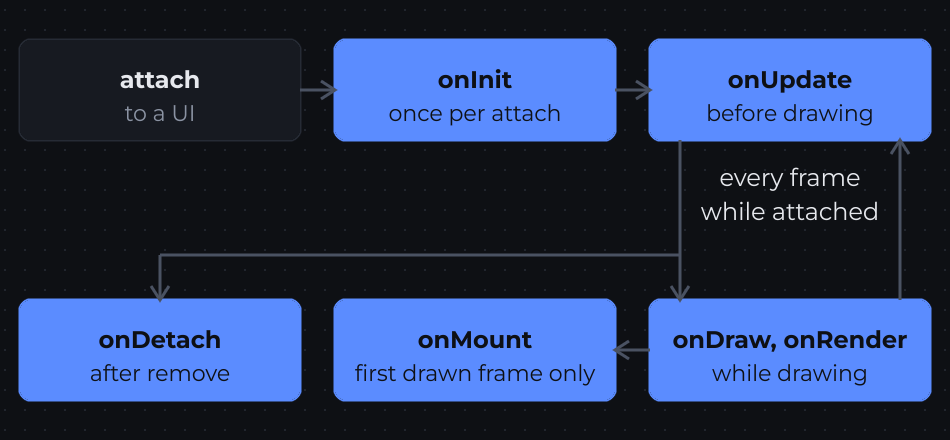
onInit and onDetach frame the life of a node; the listeners in between run on every frame.
| Listener | When it runs |
|---|---|
Node.onInit | The node joins a UI: it is attached to the UI, or to a node that is in a UI. |
Node.onUpdate | Every frame, before JOID draws anything. |
Node.onMount | The first frame where the node is drawn: it is visible and every condition of wait(...) holds. |
Node.onDraw | Every frame, right after the node drew itself, before the children drawn above it. |
Node.onRender | Every frame, after the node, its children and its layers are drawn. |
Node.onDetach | The node leaves its UI: it is removed, its parent is removed, or the UI closes. |
Node.onChildAppend | A child is appended to the node. |
Each listener receives an event; event.getNode() returns the node.
A node that is not visible skips its drawing listeners (onMount, onDraw, onRender), but onUpdate still runs.
Run code when a node joins its UI and on every frame
Section titled “Run code when a node joins its UI and on every frame”onInit prepares the state of a node, and onUpdate changes it on every frame:
RectNode.create(660, 290, 600, 160).color(LifecycleUI.SURFACE).effect(RoundedNodeEffect.create(12F)).effect(BorderNodeEffect.create(LifecycleUI.ELEMENT, 1.5F)).onInit(event -> this.start = BridgeHandler.CLOCK.get().currentTimeMillis()).onUpdate(event -> this.open = (BridgeHandler.CLOCK.get().currentTimeMillis() - this.start) / 1000D).body(card -> { TextNode .create(300, 80) .text(Text.create(() -> String.format("%.1f s", this.open), info)) .anchor(Align.CENTER) .attach(card);}).attach(this);BridgeHandler.CLOCK gives the time of JOID, the clock that a screen test moves, in milliseconds: the card shows the seconds since it joined the UI.
The text is a lambda: JOID calls it each time it draws the text, so it shows the field as it changes (Keep a text up to date).
UI.getFrameTime gives the time since the previous frame, in milliseconds, for a value that moves at a speed.
Children run onUpdate before their parent, and every node of every UI updates before anything draws (The frame lifecycle).
A child attached to a node that is not in a UI yet waits: its onInit runs when its root joins the UI, before the onInit of its parent.
A child appended to a node already in a UI joins at once.
Know when a node is drawn for the first time
Section titled “Know when a node is drawn for the first time”onMount runs on the first frame that draws the node.
It comes after onInit, and it waits for the conditions of Node.wait: an image node, for example, waits until its image is loaded (Images and media).
Rebuilding the tree shows how to add your own conditions and what JOID draws in the meantime.
Node.isAttached tells whether the node is in a UI, and Node.isMounted whether its conditions hold.
Draw around a node
Section titled “Draw around a node”onDraw runs in the coordinates where the node draws itself, so the node gives the position of what you draw:
RectNode.create(760, 480, 400, 120).color(LifecycleUI.SURFACE).effect(RoundedNodeEffect.create(12F)).effect(BorderNodeEffect.create(LifecycleUI.ELEMENT, 1.5F)).body(card -> { TextNode .create(200, 60) .text(Text.create("Underlined", info)) .anchor(Align.CENTER) .onDraw(event -> { final Node node = event.getNode(); final double bottom = node.getY() + node.getHeight(); DrawUtils.SHAPE.drawRect(node.getX(), bottom + 4D, node.getWidth(), 4D, LifecycleUI.ACCENT); }) .attach(card);}).attach(this);
onDraw adds a line under the text, in the same coordinates as the text.
onRender runs later, once the children are drawn, to draw over them.
Drawing shapes and text lists the shapes you can draw, and Custom nodes shows how to make a node that draws itself.
Release what a node started
Section titled “Release what a node started”What onInit starts outside JOID, onDetach stops:
RectNode.create(660, 630, 600, 160).color(LifecycleUI.SURFACE).effect(RoundedNodeEffect.create(12F)).effect(BorderNodeEffect.create(LifecycleUI.ELEMENT, 1.5F)).onInit(event -> this.poll = LifecycleUI.EXECUTOR.scheduleAtFixedRate(() -> this.checks++, 0L, 5L, TimeUnit.SECONDS)).onDetach(event -> this.poll.cancel(false)).body(card -> { TextNode .create(300, 80) .text(Text.create(() -> this.checks + " checks", info)) .anchor(Align.CENTER) .attach(card);}).attach(this);The card checks something every 5 seconds while it is in the UI, and stops when it leaves.
onDetach runs for the node and for each of its children, children first, when you remove the node, when you remove its parent and when the UI closes.
A node that leaves keeps its listeners: attached again, it runs onInit again, then onMount on its next drawn frame.
Moving a node to another parent detaches it, then attaches it again.
JOID stops by itself what it owns: the signals that a node follows, its hover and drag state, and the tasks of the node (Tasks and background updates).
onInitruns each time the node joins a UI;onDetachruns each time it leaves.onUpdateruns on every frame, before anything is drawn; children update before their parent.onMountruns on the first drawn frame, once the conditions ofwait(...)hold.onDrawruns after the node draws itself,onRenderafter its children.- A hidden node skips the drawing listeners but still updates.
- The children of a detached branch wait for their root to join a UI.
- Stop in
onDetachwhat you start inonInitoutside JOID.
Try it
Section titled “Try it”Count the visits.
Show how many times the timer card of LifecycleUI joined the UI.
Solution
onInit runs at every attach: increment an int field of the UI there.
.onInit(event -> this.visits++)Count the drawn frames.
Make the timer card of LifecycleUI count the frames that it draws, so that the count stops while the card is hidden with visible(false).
Solution
onUpdate runs for a hidden node too, while the drawing listeners do not: count in onDraw, in an int field of the UI.
.onDraw(event -> this.frames++)