
Text markup and effects
A style applies to a whole run of text, but a sentence often needs a bold word, an underline or a wave. JOID gives four hooks into the text it draws: markup reads tags in the string, effects change the glyphs, modifiers rewrite the string, and converters turn your own objects into strings. JOID ships none of them ready-made: you write the ones your interface needs, in a few lines each.
You will learn
- How to style parts of a string with a markup
- How to change the glyphs with a text effect
- How to transform a text with a modifier
- How to show your own types as text
Style parts of a string
Section titled “Style parts of a string”A markup is an ITextMarkup: JOID calls its parse method at each position of the string.
When a tag starts there, the markup changes the TextStyle of the glyphs that follow and returns the length of the tag; otherwise it returns 0:
public final class TagTextMarkup implements ITextMarkup {
  private static final Color ACCENT = new Color(91, 140, 255).lock();
  @Override  public int parse(final String text, final int index, final TextStyle style) {    if (text.startsWith("<b>", index)) {      style.weight(FontWeight.BOLD);      return 3;    }    if (text.startsWith("</b>", index)) {      style.weight(style.getBase().getWeight());      return 4;    }    if (text.startsWith("<em>", index)) {      style.color(TagTextMarkup.ACCENT).effect(UnderlineTextEffect.inst());      return 4;    }    if (text.startsWith("</em>", index)) {      style.color(style.getBase().getColor()).removeEffect(UnderlineTextEffect.inst());      return 5;    }    return 0;  }
}TextStyle.getBase gives the style of the TextInfo, so a closing tag restores what the opening tag changed.
A tag changes the weight, the slant, the color, the font or the effects of what follows (the setters of TextStyle), and JOID neither draws nor measures its characters.
Give the markup to a style with TextInfo.markups or TextInfo.withMarkups:
final TextInfo tagged = info.withMarkups(MarkupUI.MARKUP);TextNode.create(50, 50).text(Text.create("Read the <b>terms</b>, then <em>accept</em> them", tagged)).attach(card);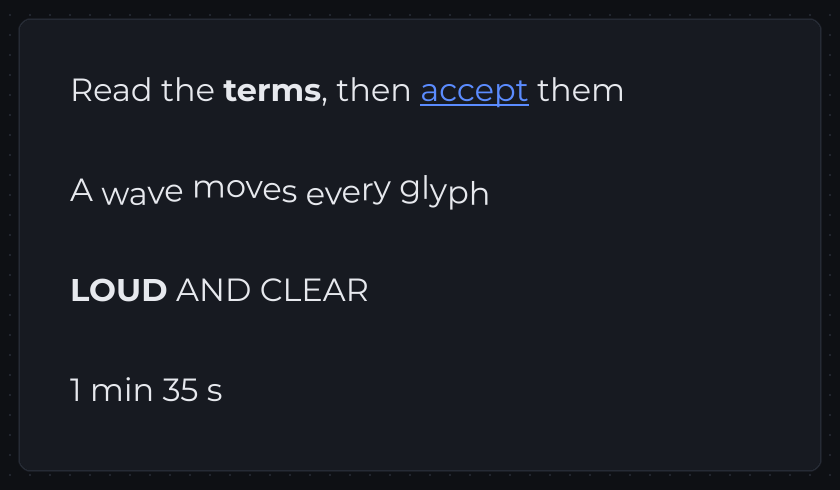
A style without its own markups uses the markups registered for the whole application with TextMarkup.register, so a tag works in every text.
markups() with no argument turns markup off for one style: the tags then show as plain text.
A text that wraps or that is cut keeps the style that a tag opened, on every line.
colored(false) on the TextInfo ignores the colors that tags set, and draws every glyph in the color of the style.
Change the glyphs with a text effect
Section titled “Change the glyphs with a text effect”A text effect is an ITextEffect with three hooks, each called once per glyph:
| Hook | When JOID calls it | Use it to |
|---|---|---|
background(glyph) | Before the glyphs are drawn | Draw under the text, such as a highlight |
apply(glyph) | Before the glyph is drawn | Move it, recolor it or swap its character |
decorate(glyph) | After the glyphs are drawn | Draw over the text, such as an underline |
The ITextGlyph gives the position, the size, the baseline and the underline of the glyph, and lets apply change it with offset, color and codepoint:
public final class WaveTextEffect implements ITextEffect {
  private static final WaveTextEffect INSTANCE = new WaveTextEffect();
  private WaveTextEffect() {}
  public static WaveTextEffect inst() {    return WaveTextEffect.INSTANCE;  }
  @Override  public void apply(final ITextGlyph glyph) {    glyph.offset(0D, Math.sin(glyph.getIndex() * 0.6D) * glyph.getSize() / 8D);  }
}
Full file: WaveTextEffect.java
Give effects to a style with TextInfo.effects or TextInfo.withEffects, for the whole text:
TextNode.create(50, 150).text(Text.create("A wave moves every glyph", info.withEffects(WaveTextEffect.inst()))).attach(card);A markup adds an effect to part of a string with style.effect(...), as <em> does with this underline:
public final class UnderlineTextEffect implements ITextEffect {
  private static final UnderlineTextEffect INSTANCE = new UnderlineTextEffect();
  private UnderlineTextEffect() {}
  public static UnderlineTextEffect inst() {    return UnderlineTextEffect.INSTANCE;  }
  @Override  public void decorate(final ITextGlyph glyph) {    final double thickness = glyph.getUnderlineThickness();    DrawUtils.SHAPE.drawRect(glyph.getX(), glyph.getUnderlineY(), glyph.getAdvance(), thickness, glyph.getColor());  }
}
Full file: UnderlineTextEffect.java
decorate draws the line with DrawUtils, the drawing API that Drawing shapes and text teaches.
An effect never changes the layout: the text keeps its width and its line breaks, wherever apply moves the glyphs.
A style with a shadow draws the glyphs twice: apply moves the shadow with its glyph, and decorate runs for the shadow too, where ITextGlyph.isShadow is true.
An effect that reads the time in apply animates, because JOID draws the text again on every frame.
This one paints three glyphs blue, one glyph further every 80 ms of the time of JOID:
public final class SweepTextEffect implements ITextEffect {
  private static final Color ACCENT = new Color(91, 140, 255).lock();
  private static final SweepTextEffect INSTANCE = new SweepTextEffect();
  private SweepTextEffect() {}
  public static SweepTextEffect inst() {    return SweepTextEffect.INSTANCE;  }
  @Override  public void apply(final ITextGlyph glyph) {    final long step = BridgeHandler.CLOCK.get().currentTimeMillis() / 80L % 30L;    if (Math.abs(step - glyph.getIndex()) < 2L) {      glyph.color(SweepTextEffect.ACCENT);    }  }
}
Full file: SweepTextEffect.java
TextNode.create(50, 40).text(Text.create("Loading the next level", info.withEffects(SweepTextEffect.inst()))).attach(card);Transform a text with a modifier
Section titled “Transform a text with a modifier”A TextModifier rewrites the string before it is drawn and measured.
Text.modifier applies one to the whole text:
TextNode.create(50, 250).text(Text.create("<b>loud</b> and clear", tagged).modifier(TextModifier.UPPER_CASE)).attach(card);The modifier receives the text of every run as one string, and leaves the tags of the markup untouched.
TextModifier holds the common ones: UPPER_CASE, LOWER_CASE, CAPITALIZE, WORD_CAPITALIZE, CAMEL_CASE, UPPER_CAMEL_CASE and SNAKE_CASE.
Any lambda from a string to a string is a modifier too: text -> text.replace("-", " ").
TextElement.modifier applies a modifier to one run only.
Text.getRawText returns the text before any modifier.
Show your own types as text
Section titled “Show your own types as text”A text can be any object: JOID turns it into a string through the registered ITextConverters, or with toString() when none supports it.
A converter says which objects it supports, then converts them:
public final class DurationTextConverter implements ITextConverter {
  @Override  public boolean supports(final Object text) {    return text instanceof Duration;  }
  @Override  public String convert(final Object text) {    final Duration duration = (Duration) text;    return duration.toMinutes() + " min " + duration.getSeconds() % 60L + " s";  }
}
Full file: DurationTextConverter.java
Register it once, when your application starts, with TextConverter.register:
TextConverter.register(MarkupUI.DURATION);From then on, a Duration given as a text shows in your format:
TextNode.create(50, 350).text(Text.create(Duration.ofSeconds(95L), info)).attach(card);The last converter registered is tried first. A string never goes through a converter.
- An
ITextMarkupreads tags in the string and changes theTextStyleof what follows; its tags are neither drawn nor measured. - A style uses its own markups (
markups(...)) or the markups registered for the application;markups()turns them off. - An
ITextEffectchanges glyphs in three hooks,background,applyanddecorate, without changing the layout; one that reads the clock animates. - A
TextModifierrewrites the whole text, tags kept; a run can have its own. - An
ITextConverter, registered once, turns your own objects into strings.
Try it
Section titled “Try it”A highlight. Write an effect that draws a grey rectangle under each glyph, from the top of the line to its bottom.
Solution
Draw in background, before the glyphs: the ascender and the descender are measured from the baseline.
@Overridepublic void background(final ITextGlyph glyph) { final double top = glyph.getBaseline() - glyph.getAscender(); final double bottom = glyph.getBaseline() - glyph.getDescender(); DrawUtils.SHAPE.drawRect(glyph.getX(), top, glyph.getAdvance(), bottom - top, HighlightTextEffect.HOVER);}Raw tags.
A help screen shows the syntax of your markup: <b>bold</b>, with its tags visible.
How do you draw it without changing the registered markups?
Solution
Give that text a style with no markup at all: info.withMarkups().
Its tags show as plain text, while every other text keeps the registered markups.