
The frame lifecycle
You need this page only if you want to know when your code runs: when a click reaches your listener, when update() runs, when a followed value takes its new value, and in which order the nodes draw.
Your loop drives the frame
Section titled “Your loop drives the frame”JOID has no loop and no thread of its own.
Your application owns the window and calls Backend.frame once per turn of its loop, between polling the window events and presenting the image (Choosing a backend).
The thread that registers the backend and calls frame() is the render thread.
Every step on this page runs on it, one after the other: nothing in a frame runs at the same time as your listeners.
Threads explains how work done on another thread gets back to it.
Input arrives between two frames
Section titled “Input arrives between two frames”Polling the window events hands each event to JOID at once, before frame().
JOID offers it to the open UIs from the top one down (Overlays and popups), and inside a UI as Events explains.
Your input listeners (handleMousePressed, onClick, shortcuts…) therefore run before the frame, and what they change is drawn by the frame() call of the same turn.
One frame, step by step
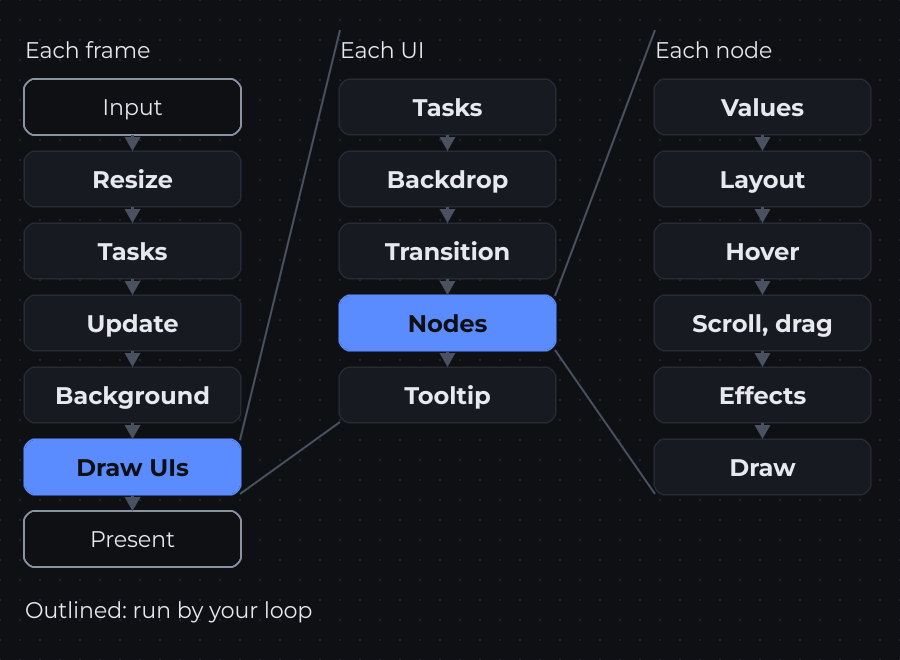
Section titled “One frame, step by step”frame() runs these steps:
- Resize, only when the size of the window changed since the last frame: every open UI fits its view to the window.
init()does not run again: it runs whenJOID.openadds the UI, and on a reload. - Tasks: the work that other threads sent to the render thread runs, in the order it was sent, then every started
TweenAnimatoradvances by the time since its last advance. ASignalwritten from another thread takes its value here. - Update: every open UI updates, hidden or not.
It reads its own followed values, updates its nodes in their order, then runs its own
update(). A node reads its followed values, firesonAnimatefor each animator whose value changed, updates its children, then runs its ownupdate()and itsonUpdatelisteners. - Background: the UI bridge with the lowest priority, by default the window UI bridge, clears the window to the window background.
- Draw UIs: every UI bridge draws its visible UIs, from the lowest priority up (Add a UI bridge of your own). Inside a bridge, the overlays drawn under the screens come first, then the screens and popups, then the overlays drawn above them.
- End: JOID closes the frame of the render bridge, and your loop presents the image.
Before it draws its UIs, a bridge also releases the GPU memory of the resources that the garbage collector reclaimed and of the off-screen images that no effect used for a while (Performance).
Inside one UI
Section titled “Inside one UI”Drawing a UI runs, in order:
- The
Tasks of the UI and of its nodes whose delay is over. A UI that is not drawn runs none. - The backdrop of a UI whose
UIDatasetsbackground = true, faded by the opening or closing transition. - The start of a running transition.
- The nodes attached to the UI, in their order, each one with its whole subtree.
- The ghost of a node being dragged, then the tooltip of the hovered node, above every node.
- The end of the transition.
The UI reads the position of the mouse once, when it starts drawing: hover tests and tooltips of the whole frame use that position.
Inside one node
Section titled “Inside one node”Drawing a node runs, in order:
- Values: the node and its children read their followed values again; a value that differs from the current one replaces it. This is when a setter given a lambda runs it, and when a setter given an expression that reads signals takes their new value (When does JOID compute this value again?).
- Layout: a layout node places its children.
- Hover: JOID tests whether the mouse is over the node and fires
onHoverStartoronHoverEndwhen the answer changes, andonHoverwhile the mouse stays over it. - Scroll and drag: a scrolling container moves its content, a dragged node moves toward the mouse, and a node in motion is shifted by whole pixels (Pixel alignment).
onMountfires on the frame the node becomes mounted. - Effects: the effects of the node open, by priority.
- Draw: the children with a negative
zindex, the node itself followed by itsonDrawlisteners, the other children, then its layers; theonRenderlisteners run once all of that is drawn. - The effects close, in reverse order.
A hidden node, or a node outside the visible area of a container that clips its content, skips all of these steps except the first; it still updates in step 3 of the frame. Node lifecycle describes each listener; this list only places them in the frame.
Where your code runs
Section titled “Where your code runs”| Your code | When it runs |
|---|---|
| Input listeners, shortcuts | When the event arrives, before the frame |
set(...) on a signal, on the render thread | At once: the bound controls and the subscribers follow, and the nodes read it at their next update or draw |
set(...) on a signal, from another thread | Tasks step of the next frame |
The listeners of a TweenAnimator (onStart, onComplete, onChange…) | Tasks step, when the animator advances |
update(), onUpdate, onAnimate | Update step, once per frame, before anything draws |
| The tasks of a UI | Start of the draw of the UI, once their delay is over |
| A lambda given to a setter | At the update and at the draw of its node, on every frame |
onHoverStart, onHover, onHoverEnd, onMount | Draw of the node, before the effects |
onDraw, onRender, layers | Draw of the node, inside the effects |
What it means for your code
Section titled “What it means for your code”- Change state in listeners and in
update(), and let the nodes read it: a value written inupdate()is drawn in the same frame. - A lambda given to a setter runs on every frame for every node that uses it, hidden or not: keep it to reading and combining values (Performance).
- Draw by hand in
onDrawor in a layer, never inupdate(): JOID draws only inside the draw step, and a draw call outside a frame throws. - Every duration JOID measures comes from the clock of JOID, never from the system.