
Events
A node reports what the user does to it through events. You subscribe to an event with a method of the node, and JOID calls your listener when the event happens. This page shows the three kinds of events, the path of an input through the node tree, and how a listener stops it.
You will learn
- How to react to a click
- How to let the pointer through a node that only decorates
- How to hear the raw input and consume it
- How to refuse a change before it happens
- How JOID orders the listeners of one event
React to a click
Section titled “React to a click”A button is a node with a listener on Node.onClick:
final TextInfo info = TextInfo.create(ExampleFont.REGULAR, 24F).color(ClickUI.TEXT);final IntegerSignal clicks = new IntegerSignal(0);
RectNode.create(760, 390, 400, 300).color(ClickUI.SURFACE).effect(RoundedNodeEffect.create(12F)).effect(BorderNodeEffect.create(ClickUI.ELEMENT, 1.5F)).body(card -> { RectNode .create(100, 80, 200, 60) .color(ClickUI.ELEMENT) .onClick(event -> clicks.increment()) .label(Text.create("Click me", info)) .attach(card); TextNode .create(200, 200) .text(Text.create("Clicks: " + clicks.get(), info)) .anchorX(Align.CENTER) .attach(card);}).attach(this);The listener receives a NodeMouseEvent: getNode() is the node, getMouseX() and getMouseY() the pointer in design pixels.
onClick runs when the left button goes down over the node, not when it goes up.
For the right or the middle button, listen to the raw press with handleMousePressed and test the MouseButton that getButton() returns (Hear the raw input).
The text under the button reads clicks, so it changes with it: Signals explains why.
Let the pointer through a decoration
Section titled “Let the pointer through a decoration”onClick runs only on a hovered node (Know which node is hovered).
A child that has no onClick of its own, such as the label of a button, lets the press reach the onClick of its parent.
A node drawn over the button that is not its child takes the pointer for itself.
The badge on the left blocks the button; the badge on the right is set with Node.interactive (false), and the pointer goes through it:
RectNode.create(100, 80, 200, 60).color(ThroughUI.ELEMENT).onClick(event -> blocked.increment()).label(Text.create("Order", info)).attach(card);CircleNode.create(270, 60, 40).color(ThroughUI.ACCENT).attach(card);RectNode.create(580, 80, 200, 60).color(ThroughUI.ELEMENT).onClick(event -> through.increment()).label(Text.create("Order", info)).attach(card);CircleNode.create(750, 60, 40).color(ThroughUI.ACCENT).interactive(false).attach(card);interactive(false) lets the press reach its button.
Three settings take a node out of the input, and each one applies to the children of the node too:
| Setting | The node is drawn | The pointer can hover it | Its listeners and its own handling run |
|---|---|---|---|
Node.interactive (false) | Yes | No, the pointer reaches the node behind | For keys and characters only |
Node.enabled (false) | Yes | Yes | No |
Node.visible (false) | No | No | No |
A node scrolled out of the area of its container is out of the input too. A node that holds the input keeps it there: a focused text field still receives its keys, a text field that selects still receives its drags, and an open selector still closes on a click beside it.
The release of a button and of a key is the exception: it reaches every node, even hidden or disabled, so that a press that started a gesture always ends it.
Hear the raw input
Section titled “Hear the raw input”The methods whose name starts with handle give you the input itself, before the node handles it:
Node.handleMousePressed, Node.handleMouseReleased, Node.handleMouseDragged, Node.handleMouseScroll, Node.handleCharTyped, Node.handleKeyPressed and Node.handleKeyReleased.
Every node of the UI receives every press, wherever the pointer is: a listener that depends on the pointer tests isHovered() itself.
RectNode.create(760, 340, 400, 400).color(PressUI.SURFACE).effect(RoundedNodeEffect.create(12F)).effect(BorderNodeEffect.create(PressUI.ELEMENT, 1.5F)).handleMousePressed(event -> { heard.increment(); if (event.getNode().isHovered()) { hovered.increment(); }}).handleMousePressed(EventListener.priority(EventPriority.MONITOR, event -> monitored.increment())).body(card -> { RectNode .create(100, 60, 200, 60) .color(PressUI.ACCENT) .onClick(event -> button.increment()) .label(Text.create("Button", label)) .attach(card); TextNode.create(60, 170).text(Text.create("Button: " + button.get(), info)).attach(card); TextNode.create(60, 220).text(Text.create("Card heard: " + heard.get(), info)).attach(card); TextNode.create(60, 270).text(Text.create("Card hovered: " + hovered.get(), info)).attach(card); TextNode.create(60, 320).text(Text.create("Monitor: " + monitored.get(), info)).attach(card);}).attach(this);A listener stops an input with NodeInputEvent.consume.
A consumed input reaches no other handle listener, no onClick, none of the handling that a node does by itself (a checkbox that toggles, a field that types), no UI below and not the host application.
The onClick of the button consumed the first press, so the listener of the card never heard it.
Only a listener of the priority MONITOR still receives a consumed input (Order the listeners of one event).
Because the listeners of a node run before its own handling, a listener can keep an input from the node itself. This field never receives a digit:
TextFieldNode.create(50, 70, 300, 60).info(info).placeholder("No digits").placeholderColor(NoDigitsUI.MUTED).background(RectNode.create(0, 0, 0, 0).color(NoDigitsUI.ELEMENT)).marginHorizontal(12D).handleCharTyped(event -> { if (Character.isDigit(event.getCodepoint())) { event.consume(); }}).attach(card);R2D2: the listener consumes both digits before they reach the field.
Follow an input through the tree
Section titled “Follow an input through the tree”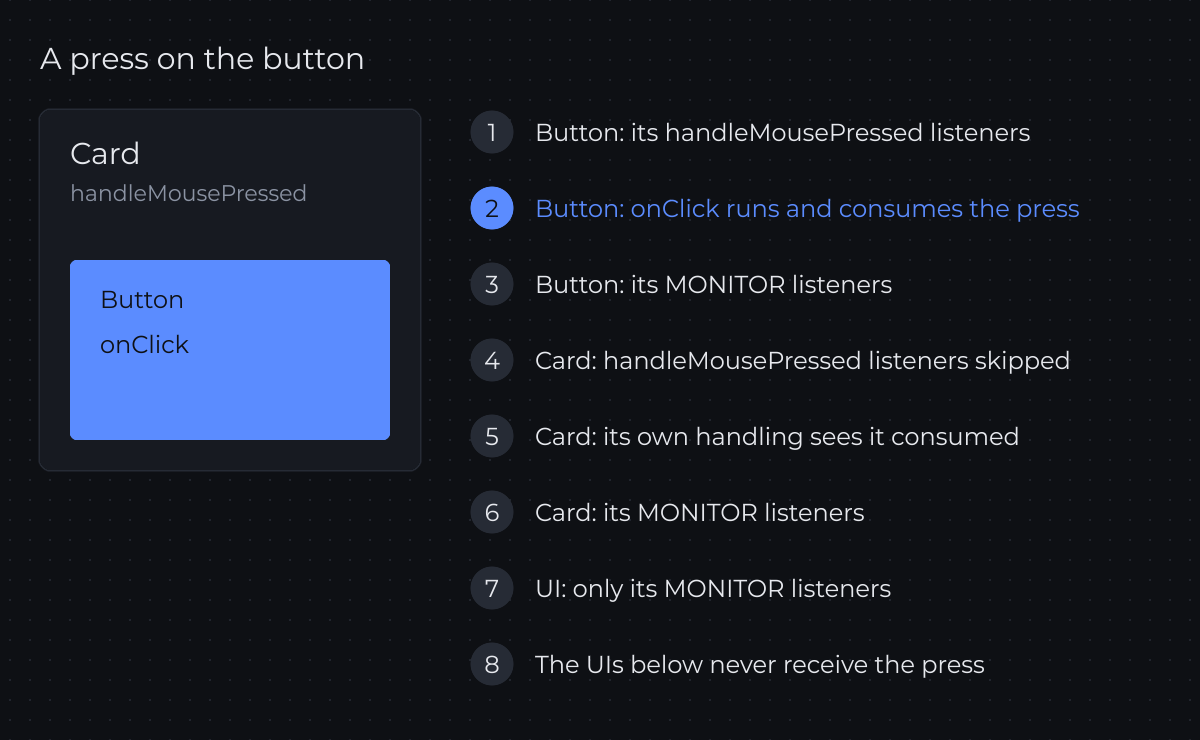
MONITOR listeners still hear it.
JOID sends an input to the nodes of the UI from the front to the back: the node drawn last receives it first. Inside one node, the order is:
- its children, from the front to the back, each one with its own children first;
- its
handlelisteners; - its own handling:
onClickfor a press, the toggle of a checkbox, the typing of a field; - its children with a negative
zindex, drawn behind it; - its
MONITORlisteners.
After the nodes, the UI receives the input that no node consumed: UI.handleMousePressed and the other handle methods of UI react to a press in an empty area, for example to close a menu.
An input that the UI does not consume goes on to the UI below it (How UIs stack).
Node.fireMousePressed and the other fire methods of a node send a simulated input to it and its children, and return true when a listener consumed it.
Refuse a change before it happens
Section titled “Refuse a change before it happens”A change that the user or your code asks for, such as moving a node, first goes through a before event.
This square refuses to move past x = 400:
final RectNode square = RectNode.create(40, 40, 60, 60).color(LimitUI.ACCENT).beforeMove(event -> { if (event.getValue().getX() > 400D) { refused.increment(); event.cancel(); }}).attach(card);RectNode.create(40, 200, 200, 60).color(LimitUI.ELEMENT).onClick(event -> square.move(square.getX() + 100D, 40D)).label(Text.create("Move right", info)).attach(card);x = 440, is refused.
Node.beforeMove receives a NodeChangeEvent.Pre: getPrevious() is the value now, getValue() the value asked for, and NodeChangeEvent.Pre.cancel refuses it.
After a change that went through, Node.onMove receives a NodeChangeEvent.Post with the same two values.
A before event guards the changes that a gesture asks for and the calls that make the same request, such as Node.move or the change(...) of a control.
The setters that give a node its value, such as x(...), and the signals bound to it are never refused.
A UI has the same pair for its closing: UI.beforeClose can keep it open, and UI.onClose runs once it is closed.
Every event method starts with handle, before or on, and its listener receives one event object, which holds the node (getNode()) or the UI (getUi()) and the values of the event.
A node also has events of its own life, such as Node.onInit or Node.onDetach: Node lifecycle lists them.
Order the listeners of one event
Section titled “Order the listeners of one event”Every node and every UI holds its listeners in an EventBus, one list per EventType.
The listeners of one event run in the order of their listener priority, an EventPriority, then in the order you added them.
EventListener.priority gives a listener another priority than NORMAL:
button.onClick(event -> log.add("second")).onClick(EventListener.priority(EventPriority.HIGH, event -> log.add("first")));The priorities run from HIGHEST to LOWEST, then MONITOR.
Once a listener consumes an input or cancels a change, the listeners after it do not run, except the MONITOR ones.
A MONITOR listener only reads: it runs even after a consume or a cancel, and calling consume() or cancel() there throws an IllegalStateException.
A listener that throws an exception does not stop the others: JOID prints a warning once and runs the next listener.
A listener of a UI added in init() lasts one opening, one added in the constructor stays (Open and close a UI).
Node.onClickruns when the left button goes down over the node, and consumes the press.onClickruns only on a hovered node;interactive(false)lets the pointer through a node.- The
handlelisteners hear the raw input of the whole UI, wherever the pointer is, before the node handles it;consume()stops the input. - A consumed input reaches no other
handlelistener, no UI below and not the host; only theMONITORlisteners still hear it. - A
beforelistener cancels a change that a gesture or a call such asmove(...)asks for; setters and signals are never refused. - The
onlisteners tell what happened. - Listeners run by listener priority (
EventPriority), then in the order you added them.
Try it
Section titled “Try it”Right clicks only.
Count the presses of the right button on the button of ClickUI, and only those.
Solution
onClick reacts only to the left button, so listen to the raw press and test the pointer yourself:
.handleMousePressed(event -> { if (event.getNode().isHovered() && event.getButton().isRight()) { clicks.increment(); }})Count what nobody took.
In PressUI, count the presses that no node consumed: a press on the button must not count.
Solution
The UI receives the input after its nodes, and only when no node consumed it:
super.handleMousePressed(event -> free.increment());The press on the button is consumed by its onClick, so it never reaches this listener.