
Performance
You need this page only if your interface drops frames, if its memory keeps growing, or if you create framebuffers yourself.
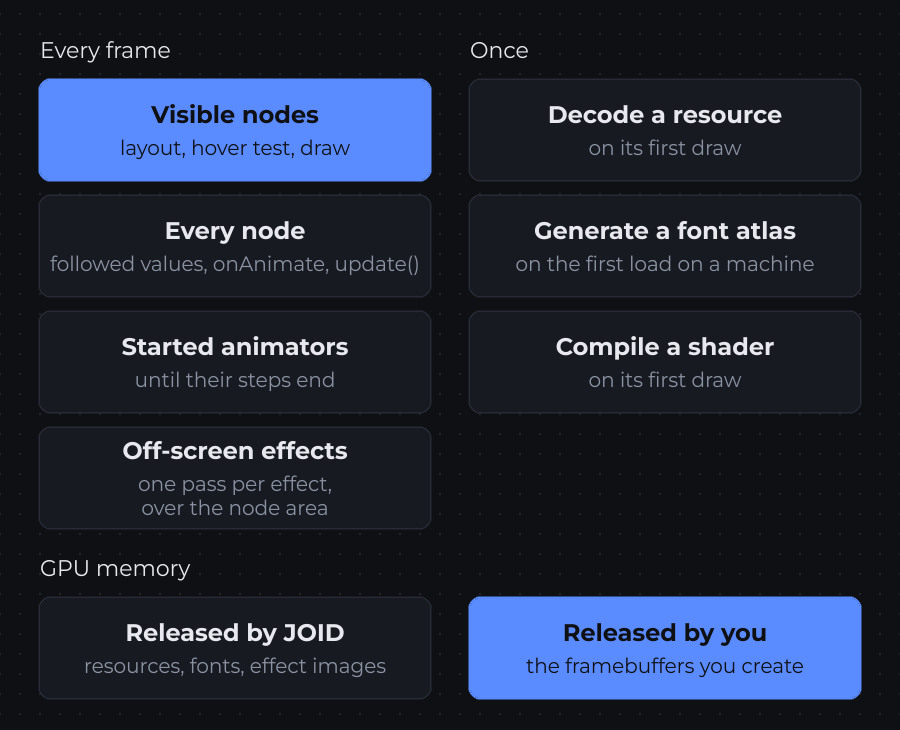
| Work | When it runs | Cost grows with |
|---|---|---|
| Layout, hover test, drawing | Every frame, for every visible node | The number of visible nodes |
Followed values, onAnimate, update() | Every frame, for every attached node, hidden or not | The number of nodes |
| Started animators | Every frame, until their steps end, whether a UI shows them or not | The number of started animators |
| Effects that render off screen (rounded corners, circle, border, blur) | Every frame, for every node that has one | The visible area of the node and the number of passes |
A derived value (map, Signal.from, an expression given to a setter) | Only when a signal it reads changes | What the expression computes |
| Decoding an image, a video or an SVG | The first time it is drawn | The size of the file |
| Generating a font atlas | The first time a font file loads on a machine | The number of faces |
| Compiling a shader | The first time it draws | The number of shaders |
Every frame: the nodes
Section titled “Every frame: the nodes”JOID keeps no picture of the previous frame. On every frame, every attached node updates, and every visible node places its children, tests the hover and draws, as The frame lifecycle lists.
A node outside the visible area of a container that clips its content (HIDDEN or SCROLL overflow) is neither drawn nor tested for hover, and its children are skipped.
It still updates: a list of a thousand rows costs a thousand small updates on every frame.
A node outside the window, without such a container around it, is drawn for nothing.
A detached node costs nothing, while visible(false) skips the draw but keeps the updates, the animators and the subscriptions of the node.
Every frame: the lambdas
Section titled “Every frame: the lambdas”A setter given a lambda runs it at the update and at the draw of its node, on every frame. JOID compares the result with the current value and applies it only when it differs, so an unchanged value costs the call and the comparison.
Keep a lambda to reading and combining values. A lambda that builds a large object, parses text or reads a file does it twice per frame for each node that uses it.
Effects that render off screen
Section titled “Effects that render off screen”The rounded corner, circle, border and blur effects draw the node, or its subtree, into an off-screen image first, then run one shader pass per effect over it, on every frame. Each pass costs a draw of the visible area of the node, and a blur costs two passes, one horizontal and one vertical. Shadows, masks and transforms draw in place and cost much less.
The effects draw into targets borrowed from the FrameBufferPool and reused from frame to frame (Borrow a temporary target).
Once: resources, fonts and shaders
Section titled “Once: resources, fonts and shaders”A resource decodes in the background the first time it is drawn, and the node shows its skeleton until it is ready (Images and media).
A Resource.blocking resource decodes on the render thread instead, so a large image, or a file read from the network, stops every UI while it loads.
An SVG is rasterized at the pixel size it is drawn at, again for each new size. The first load of a font file on a machine generates its atlas once (MSDF text). A shader compiles the first time it draws, so an effect or a shader that appears for the first time can make that frame longer.
GPU memory and who releases it
Section titled “GPU memory and who releases it”| GPU resource | Size | Released by |
|---|---|---|
| A resource (image, animated image, video, SVG) | Width × height × 4 bytes, a third more with mipmaps | JOID, once no object refers to it and the shared cache dropped it, 5 minutes after its last use; or you, at once, with Resource.clear |
| A font face | 16 MB (a 2048 × 2048 atlas) | JOID, with the font |
The targets of FrameBufferPool: the off-screen images of effects and the targets you borrow | One set per owner, depth and count (for effects, per level of nesting), as large as the largest area that used it in the last 5 seconds | JOID, 5 seconds after their last use |
A FrameBuffer you create | Width × height × 4 bytes, plus depth | You, with FrameBuffer.delete |
JOID releases what the garbage collector reclaims on the render thread, before the next frame draws. A framebuffer of yours lives until you delete it: Framebuffers and models shows where to create and delete it.
Find the slow part
Section titled “Find the slow part”In dev mode, JOID prints the load time of each UI and every frame of a UI that takes more than 16.66 ms to draw, except the first one after a load, and the inspector shows each node. Dev tools explains both.
What it means for your code
Section titled “What it means for your code”- Detach the nodes you do not show, and for a long list attach only the rows near the visible area, replaced as the scroll moves (Rebuilding the tree).
- Keep lambdas to reading and combining values; for a value that depends on signals, give an expression or a derived value, computed only when one of its signals changes.
- Keep
blocking()for small images, and preload a large one withgenerate()(Know when an image is loaded). - Delete the framebuffers you create (Framebuffers and models).