
Framebuffers and models
Some drawings cost too much to repeat on every frame, some need a target of their own, some need geometry that no helper draws, and some are in 3D.
This page closes the drawing chapter with the tools for these cases: framebuffers, the framebuffer pool, the Tessellator and 3D models.
You will learn
- How to draw once into a framebuffer and reuse the result
- How to borrow a temporary target on every frame
- How to build your own geometry, vertex by vertex
- How to use the texture of a resource in your own drawing
- How to draw a 3D model in your own drawing code
Draw once, reuse every frame
Section titled “Draw once, reuse every frame”A FrameBuffer is an offscreen image: you fill it once, then draw it as often as you need, at any size.
This node fills one on its first frame, draws it, and deletes it when it leaves its UI:
public class StampNode extends Node {
  private static final Color ELEMENT = new Color(38, 43, 53).lock();  private static final Color ACCENT  = new Color(91, 140, 255).lock();
  private transient FrameBuffer frameBuffer;
  protected StampNode(final double x, final double y, final double width, final double height) {    super(x, y, width, height);  }
  public static StampNode create(final double x, final double y, final double size) {    return new StampNode(x, y, size, size);  }
  @Override  public void draw(final double mouseX, final double mouseY) {    if (this.frameBuffer == null) {      this.frameBuffer = FrameBuffer.create(128, 128, TextureFilter.LINEAR).fill(() -> {        BridgeHandler.RENDER.get().clearColor(0F, 0F, 0F, 0F);        DrawUtils.SHAPE.drawCircle(64D, 64D, StampNode.ELEMENT, 64D);        DrawUtils.SHAPE.drawCircle(64D, 64D, StampNode.ACCENT, 40D);      });    }
    this.frameBuffer.draw(super.getX(), super.getY(), super.w(), super.h());  }
  @Override  public void detach() {    if (this.frameBuffer != null) {      this.frameBuffer.delete();      this.frameBuffer = null;    }  }
}ContainerNode.create(80, 80, 300, 200).body(container -> { StampNode.create(20, 36, 128).attach(container); StampNode.create(188, 68, 64).attach(container);}).attach(this);Full file: FramebuffersUI.java

FrameBuffer.create(width, height, filter)allocates the buffer, in pixels; theTextureFilterdecides how it is sampled when drawn at another size.fill(drawing)draws into the buffer: inside, coordinates are pixels of the buffer from its top-left corner, and everyDrawUtilscall works.draw(x, y, width, height)draws the content in a box, in design pixels.delete()releases the memory of the graphics card.
Nothing clears the buffer: clear it at the start of fill through the render bridge, RENDER of BridgeHandler: BridgeHandler.RENDER.get().clearColor(red, green, blue, alpha), as above.
Fill it again only when its content changes; draw before the first fill throws IllegalStateException.
fill(x, y, width, height, drawing) maps a region of your coordinates onto the whole buffer, to capture what you draw at its usual place.
Borrow a temporary target
Section titled “Borrow a temporary target”A drawing that needs a fresh target on every frame, such as a group of shapes drawn with one shared transparency, borrows it from the FrameBufferPool instead of keeping a framebuffer:
ContainerNode.create(740, 80, 300, 200).layer((node, mouseX, mouseY) -> {  final IRenderBridge render = BridgeHandler.RENDER.get();  final PixelGrid grid = render.getPixelGrid();  final int width = grid.toPixelWidth(node.getWidth());  final int height = grid.toPixelHeight(node.getHeight());  final IFrameBuffer target = FrameBufferPool.allocate(FramebuffersUI.class, 0, 1, width, height)[0];  render.withState(state -> render.getProjection().with(projection -> render.getModelView().with(view -> {    state.getState().frameBuffer(target).viewport(0, 0, width, height);    projection.ortho(0D, node.getWidth(), node.getHeight(), 0D, -1000D, 1000D);    view.identity();    render.clearColor(0F, 0F, 0F, 0F);    DrawUtils.SHAPE.drawCircle(100D, 100D, FramebuffersUI.TEXT, 80D);    DrawUtils.SHAPE.drawCircle(200D, 100D, FramebuffersUI.TEXT, 80D);  })));
  final double u = (double) width / target.getWidth();  final double v = (double) height / target.getHeight();  render.withState(state -> {    state.getState().color(0.5F, 0.5F, 0.5F, 0.5F);    final TextureFilter filter = TextureFilter.LINEAR;    final BlendState blend = BlendState.PREMULTIPLIED;    final ITexture texture = target.getTexture();    DrawUtils.RESOURCE.drawTexture(0D, 0D, node.w(), node.h(), texture, 0D, v, u, 0D, filter, blend);  });}).attach(this);
Full file: FramebuffersUI.java
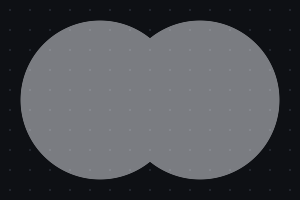
FrameBufferPool.allocate(owner, depth, count, width, height) returns count targets of at least width × height pixels.
The pool keeps one set per owner, depth and count, and grows it by powers of two, so the next frame gets the same targets back.
Pass a depth of your own when a drawing nests inside another drawing of the same owner, so that both do not share a target.
JOID deletes the sets that no frame uses any more, and shrinks those that are larger than recent frames need (Performance gives the delays), so you never delete a borrowed target.
Inside, the drawing sets the target and the viewport in the render state, and a projection that maps your coordinates onto the pixels of the target.
The target is larger than what you drew: u and v keep the used part when you draw its texture with drawTexture.
The texture holds premultiplied colors, so it draws with PREMULTIPLIED of BlendState, and the color of the render state scales the whole group.
To post-process what you draw, such as a blur or rounded corners, use a shader pass instead: Shaders shows how.
Build your own geometry
Section titled “Build your own geometry”The Tessellator collects vertices and sends them in one draw call; every DrawUtils call uses it.
Here, a triangle with one color per vertex:
ContainerNode.create(460, 80, 200, 200).layer((node, mouseX, mouseY) -> { final Tessellator tessellator = Tessellator.inst(); BridgeHandler.RENDER.get().withState(render -> { render.getState().blend(BlendState.NORMAL).texture(null); tessellator.start(DrawMode.TRIANGLES); tessellator.setColor(231, 233, 238); tessellator.addVertex(100D, 0D, 0D); tessellator.setColor(91, 140, 255); tessellator.addVertex(200D, 200D, 0D); tessellator.setColor(38, 43, 53); tessellator.addVertex(0D, 200D, 0D); tessellator.draw(); });}).attach(this);Full file: FramebuffersUI.java
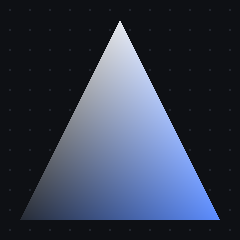
Tessellator.inst()returns the shared tessellator, andstart(mode)begins a shape in aDrawMode:TRIANGLES,QUADS,POLYGON(a convex fan),LINES,LINE_STRIPorLINE_LOOP.setColor(...),setTextureUV(u, v)andsetNormal(x, y, z)apply to the vertices added after them.addVertex(x, y, z)andaddVertexWithUV(x, y, z, u, v)add the vertices, in your drawing coordinates.draw()sends them.
A shape without setColor takes the color of the render state.
The tessellator does not touch the render state: set the blending, the texture and the shader yourself, inside withState(...) (Drawing resources and transforms).
start while a shape is open, or draw without start, throws IllegalStateException.
To fill a texture with pixels of your own, create it with createTexture() of the render bridge, then call allocate(width, height) and upload(pixels) of the ITexture, one ARGB int per pixel, row by row from the top.
Delete it with delete(), like a framebuffer.
Use the texture of a resource
Section titled “Use the texture of a resource”To texture your geometry with an image, draw it inside resource.bind(wrap, drawing) of a Resource.
It starts the decoding when needed, uploads the decoded pixels once they are ready, binds the texture with the filter of the resource and the given TextureWrap, and unbinds it after the drawing, even when the drawing throws.
getTexture() gives the ITexture itself, for a sampler of a shader or a bitmap font, and null while there is none.
To get it without bind or a node that draws the resource, call Resource.prepareBind on the render thread at each use: it creates the texture, then uploads the image once it is loaded.
isUploaded() tells that the texture holds the image; a texture that is not null may still be empty while the resource loads in the background.
Draw a 3D model
Section titled “Draw a 3D model”DrawUtils.MODEL, a DrawModel, draws an IDrawableModel, such as an ObjModel loaded as 3D models shows, or a model of your own:
public class PyramidModel implements IDrawableModel {
  private static final double[][] CORNERS = {{-0.5D, -0.5D}, {0.5D, -0.5D}, {0.5D, 0.5D}, {-0.5D, 0.5D}};
  @Override  public void render() {    final Tessellator tessellator = Tessellator.inst();    tessellator.start(DrawMode.TRIANGLES);    tessellator.setColor(91, 140, 255);    for (int side = 0; side < 4; side++) {      final double[] start = PyramidModel.CORNERS[side];      final double[] end = PyramidModel.CORNERS[(side + 1) % 4];      final float normalX = (float) (start[0] + end[0]);      final float normalZ = (float) (start[1] + end[1]);      tessellator.setNormal(normalX, 0.5F, normalZ);      tessellator.addVertex(start[0], -0.5D, start[1]);      tessellator.addVertex(end[0], -0.5D, end[1]);      tessellator.addVertex(0D, 0.5D, 0D);    }    tessellator.draw();  }
  @Override  public double getWidth() {    return 1D;  }
  @Override  public double getHeight() {    return 1D;  }
  @Override  public double getDepth() {    return 1D;  }
}private static final Color TEXT = new Color(231, 233, 238).lock();
private final PyramidModel pyramid = new PyramidModel();
private final Transformation turn = Transformation.create().translate(Vector.create(100D, 120D)).rotate(20D, Rotation.YAW).rotate(-30D, Rotation.PITCH);Full file: FramebuffersUI.java
ContainerNode.create(1120, 80, 200, 200).layer((node, mouseX, mouseY) -> this.turn.apply(() -> DrawUtils.MODEL.drawModel(0D, 0D, 120D, this.pyramid))).attach(this);Full file: FramebuffersUI.java
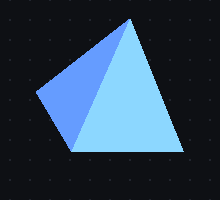
drawModel(x, y, size, model) puts the origin of the model on (x, y) and draws one model unit as size design pixels; drawModel(x, y, sizeX, sizeY, sizeZ, model) scales each axis on its own.
Models follow the convention of modeling tools: +X goes right, +Y goes up and +Z comes toward you.
The light comes from the viewer, and normals decide how much light each face gets.
Each call clears the depth buffer before and after the model, so what you draw next covers it.
render() sends the geometry around the origin, and getWidth(), getHeight(), getDepth() give its size in model units.
To show a model as a node that the user turns, use a ModelNode (3D models).
- A
FrameBufferholds a drawing that youfillonce anddrawas often as you need. - Clear the buffer yourself in
fill, anddelete()it when its node detaches. - The
FrameBufferPoollends temporary targets for one frame and deletes them when no frame uses them. - The
Tessellatorsends your own vertices:start, set color, texture coordinates or normals, add vertices,draw. - The tessellator uses the render state as it is: set it inside
withState(...). resource.bind(...)textures your geometry;prepareBind()readies the texture of a resource by hand.DrawUtils.MODELdraws anIDrawableModel, such as anObjModel, with its origin at a point.
Try it
Section titled “Try it”A grey square.
Draw a grey square of 100 design pixels with DrawMode.QUADS.
Solution
After tessellator.start(DrawMode.QUADS), one quad takes four vertices, in order around the square:
tessellator.addVertex(0D, 100D, 0D);tessellator.addVertex(100D, 100D, 0D);tessellator.addVertex(100D, 0D, 0D);tessellator.addVertex(0D, 0D, 0D);Then setColor before the vertices, and draw().
Refresh the stamp.
Make StampNode draw a new picture when its size changes.
Solution
Delete the buffer and set the field to null when the size differs from the one you filled it for; draw creates and fills a new one on the next frame.
Filling the same buffer again also works when its size stays right: clear it first.
A taller pyramid. Draw the pyramid twice as tall as it is wide.
Solution
Scale each axis on its own:
DrawUtils.MODEL.drawModel(100D, 120D, 80D, 160D, 80D, this.pyramid);