
Custom fonts and MSDF
Fonts loads the .ttf and .otf files of a font, which covers most interfaces.
This page covers the other cases: letters drawn from a pixel-art atlas, glyphs drawn your own way, a text engine of your own, and MSDF atlases generated before your application ships.
You will learn
- How to choose the level of a custom font
- How to write a pixel-art font on a bitmap atlas
- What a glyph font and a raw font must implement
- How to set the weight of a font file yourself
- How to generate MSDF atlases before you ship
Choose the level
Section titled “Choose the level”Every font is an IFont, and every TextInfo takes one.
Pick the highest level that fits: each level down leaves more to you.
| Level | You write | JOID does |
|---|---|---|
Bitmap font: BitmapFont and BitmapTextRenderer | A face, the font, and where each glyph lies in its atlas | Everything a glyph font gets, plus the drawing: nearest texels, lines on the pixel grid, synthetic bold and italic |
Glyph font: GlyphFont and GlyphTextRenderer | A face, the font, and how one glyph is drawn | Weights, italic, kerning, letter spacing, markup, text effects, shadows and measuring |
Raw font: IFont and ITextRenderer | The layout, the drawing and the measuring of a whole line | A font that goes everywhere a TextInfo goes |
Write a pixel-art font
Section titled “Write a pixel-art font”A bitmap font draws its letters from an atlas of pixel-art cells, at the size you ask for, sharp at every scale of the window.
It takes three classes.
The face, an IFontFace, describes one weight and one style of the font:
public class FontsPixelFontFace implements IFontFace {
  private static final ResourceBuilder ATLAS = ResourceBuilder.create().cache(null).nearest().mipmap(false);
  private final int[]    advances;  private final Resource atlas;
  protected FontsPixelFontFace(final int[] advances, final Resource atlas) {    this.advances = advances;    this.atlas = atlas;  }
  public static FontsPixelFontFace from(final BufferedImage image) {    final int[] advances = new int[95];    advances[0] = 4;    for (int codepoint = '!'; codepoint <= '~'; codepoint++) {      final int left = FontsPixelFontFace.cellX(codepoint);      final int top = FontsPixelFontFace.cellY(codepoint);      int width = 0;      for (int x = 0; x < FontsPixelFont.SIZE; x++) {        for (int y = 0; y < FontsPixelFont.SIZE; y++) {          if (image.getRGB(left + x, top + y) >>> 24 != 0) {            width = x + 1;          }        }      }      advances[codepoint - ' '] = width + 1;    }    return new FontsPixelFontFace(advances, FontsPixelFontFace.ATLAS.of(image).blocking());  }
  public Resource getAtlas() {    return this.atlas;  }
  @Override  public boolean isItalic() {    return false;  }
  @Override  public float getAscender() {    return 7F / FontsPixelFont.SIZE;  }
  @Override  public float getDescender() {    return -2F / FontsPixelFont.SIZE;  }
  @Override  public float getLineHeight() {    return 9F / FontsPixelFont.SIZE;  }
  @Override  public float getUnderlineY() {    return -1F / FontsPixelFont.SIZE;  }
  @Override  public float getUnderlineThickness() {    return 1F / FontsPixelFont.SIZE;  }
  @Override  public String getName() {    return "Pixel";  }
  @Override  public FontWeight getWeight() {    return FontWeight.REGULAR;  }
  @Override  public float getAdvance(final int codepoint) {    return this.hasGlyph(codepoint) ? (float) this.advances[codepoint - ' '] / FontsPixelFont.SIZE : 0F;  }
  @Override  public float getKerning(final int previous, final int current) {    return 0F;  }
  @Override  public boolean hasGlyph(final int codepoint) {    return codepoint >= ' ' && codepoint <= '~';  }
  public static int cellX(final int codepoint) {    return (codepoint - ' ') % 16 * FontsPixelFont.SIZE;  }
  public static int cellY(final int codepoint) {    return (codepoint - ' ') / 16 * FontsPixelFont.SIZE;  }
}
Full file: FontsPixelFontFace.java
Every metric is a fraction of the em, measured up from the baseline: the descender and the underline are negative.
This atlas has 16 cells of 8 × 8 texels per row, from the space to ~, so a font pixel is 1F / 8F of the em.
from(image) measures each cell once, so that a narrow letter advances less than a wide one.
hasGlyph decides which characters exist: JOID skips the others, and a space without a glyph advances by a quarter of the em.
The font gives its family, its bitmap size (the number of font pixels per em) and its renderer:
public class FontsPixelFont extends BitmapFont<FontsPixelFontFace> {
  public static final int SIZE = 8;
  protected FontsPixelFont(final FontFamily<FontsPixelFontFace> family) {    super(family, FontsPixelFont.SIZE);  }
  public static FontsPixelFont load(final String path) {    try (final InputStream stream = FontsPixelFont.class.getResourceAsStream(path)) {      final BufferedImage image = ImageIO.read(stream);      return new FontsPixelFont(FontFamily.of(FontsPixelFontFace.from(image)));    } catch (final IOException exception) {      throw new UncheckedIOException("The pixel font " + path + " cannot be read", exception);    }  }
  @Override  public ITextRenderer getTextRenderer() {    return FontsPixelTextRenderer.inst();  }
}
Full file: FontsPixelFont.java
FontFamily.of(faces...) takes at least one face, and never two faces of the same weight and style.
The renderer tells where each glyph lies in the atlas:
public final class FontsPixelTextRenderer extends BitmapTextRenderer<FontsPixelFontFace> {
  private static final FontsPixelTextRenderer INSTANCE = new FontsPixelTextRenderer();
  private FontsPixelTextRenderer() {}
  public static FontsPixelTextRenderer inst() {    return FontsPixelTextRenderer.INSTANCE;  }
  @Override  protected BitmapCell getCell(final TextGlyph<FontsPixelFontFace> glyph) {    final int codepoint = glyph.getCodepoint();    final Resource atlas = glyph.getFace().getAtlas();    atlas.prepareBind();    if (codepoint == ' ' || !glyph.hasGlyph(codepoint) || atlas.getTexture() == null) {      return null;    }
    final int x = FontsPixelFontFace.cellX(codepoint);    final int y = FontsPixelFontFace.cellY(codepoint);    final boolean bold = glyph.getStyle().getWeight().getValue() > glyph.getFace().getWeight().getValue();    return BitmapCell    .create(atlas.getTexture(), x, y, x + FontsPixelFont.SIZE, y + FontsPixelFont.SIZE)    .bold(bold);  }
}
Full file: FontsPixelTextRenderer.java
getCell returns a BitmapCell for the glyph, or null to draw nothing.
The renderer reads the texture of the atlas without drawing the resource, so prepareBind() decodes and uploads it first (Framebuffers and models explains the texture of a resource).
The atlas is loaded with nearest sampling, no mipmaps and no cache, and blocking() decodes it on its first use, so the text draws from the first frame (Images and media explains these settings).
Load the font once, then use it like any other:
private static final FontsPixelFont PIXEL = FontsPixelFont.load("/fonts/Pixel/pixel.png");final TextInfo title = TextInfo.create(FontsUI.PIXEL, 64F).color(FontsUI.TEXT);final TextInfo line = TextInfo.create(FontsUI.PIXEL, 24F).color(FontsUI.TEXT);
TextNode.create(100, 100).text(Text.create("GAME OVER", title)).attach(this);
TextNode.create(100, 190).text(Text.create("Press any key", line)).attach(this);
TextNode.create(100, 230).text(Text.create("Synthetic bold", line.withWeight(FontWeight.BOLD))).attach(this);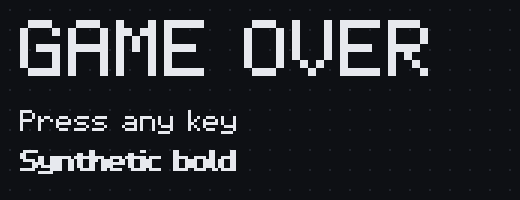
A bitmap font keeps the size you ask for: at 64 design pixels and a bitmap size of 8, a font pixel is 8 design pixels wide.
BitmapCell | What it sets |
|---|---|
BitmapCell.create(texture, texelLeft, texelTop, texelRight, texelBottom) | The atlas and the texels of the glyph. |
bounds(left, top, right, bottom) | Where the cell is drawn, in font pixels from the top of the ascender; the size of the cell in texels by default. Set it when the atlas has more than one texel per font pixel. |
grayscale(boolean) | If true, the red channel of the atlas holds the coverage, for an atlas with one channel. |
bold(boolean) | If true, the cell is drawn twice, one font pixel apart: a synthetic bold. |
The renderer asks for bold when the text asks for a heavier weight than its face.
In dev mode, JOID still warns once that the weight 700 is not loaded in the family: the synthetic bold stands in for a face that does not exist.
An italic text drawn with an upright face is slanted the same way.
Draw each glyph yourself
Section titled “Draw each glyph yourself”A GlyphFont holds a FontFamily of faces, and its GlyphTextRenderer lays out each line: it picks the face of each weight and style, applies the kerning, the letter spacing, the markup and the text effects, then hands you each glyph to draw.
A bitmap renderer is a glyph renderer that draws a cell of an atlas; a glyph renderer of your own draws each glyph its own way.
Its constructor names the built-in shader that draws the glyphs, a value of CoreShader, and JOID compiles it on the first line it draws.
The renderer overrides these methods:
| Method | JOID calls it |
|---|---|
drawGlyph(glyph) | For each glyph of the line, between begin() and end(). Required. |
begin(), end() | Before and after the glyphs of a line: begin() binds the shader, end() unbinds it. An override calls super. |
isGridAligned() | Returns true to start lines and baselines on the pixel grid, as pixel-art fonts need; false by default. |
A line with a shadow runs these methods twice: once for the shadow, then once for the text.
Inside drawGlyph, getShader() returns the compiled shader, getGrid() the PixelGrid of the frame, and bindColor(color) sets the color of the glyph, a gradient included.
Draw a TextGlyph from its getters, read in drawGlyph: the text effects change them before the call.
getX() and getBaseline() give the pen position in design pixels, getOffsetX() and getOffsetY() the offset that an effect adds, getCodepoint() the character and getColor() the color, the shadow color in the shadow pass; TextGlyph lists the metrics of the face.
Know what a raw font must do
Section titled “Know what a raw font must do”When text is not a row of glyphs on a baseline, implement IFont and its ITextRenderer yourself.
Markup, text effects, shadows, letter spacing and weights are then yours to implement.
ITextRenderer method | Contract |
|---|---|
drawText(x, y, text, info) | Draws one line with its top-left corner at x, y, and returns its FontBounds. |
getWidth(text, info) | The width of the line, equal to what drawText draws, or alignment and wrapping go wrong. |
getHeight(text, info), getLineHeight(info) | The height of the line and the distance between two lines. |
getBaseline(info) | The distance from the top of the line to its baseline; the line height by default. |
The overload of drawText that also takes the bounds of the whole run receives them so that a gradient spans every line of a text; by default it ignores them.
Set the weight of a font file
Section titled “Set the weight of a font file”MsdfFontLoader reads the weight and the italic flag of each file from the file itself.
When a file says the wrong thing, wrap it in a source and say it yourself:
public static final MsdfFont LIGHT = MsdfFontLoader.load( OpenTypeMsdfSource .of(FontsSources.class.getResourceAsStream("/fonts/Montserrat/Montserrat-Regular.ttf")) .weight(FontWeight.LIGHT)).join();OpenTypeMsdfSource.of reads a .ttf, .otf or .ttc file, and BinaryMsdfSource.of a .msdf atlas.
Both extend MsdfSource, which takes weight(...) and italic(...).
load(...) takes any IMsdfSource next to files, streams and paths: a source of your own implements read() and returns the MsdfFontFace.
Generate MSDF atlases before you ship
Section titled “Generate MSDF atlases before you ship”The first time a font file loads on a machine, JOID generates its MSDF atlas and keeps it in the cache folder (MSDF text explains the atlas).
To skip that delay, generate the atlas before you ship, with the MSDF generator (MsdfGenerator): the jar joid-tool-msdf-<version>.jar of each release, which runs on Java 8 and needs nothing else.
java -jar joid-tool-msdf-<version>.jar --font Montserrat-Regular.ttf --output fonts/Montserrat-Regularjava -jar joid-tool-msdf-<version>.jar --font Montserrat-Bold.ttf --output fonts/Montserrat-BoldEach run writes one font.msdf file into its output folder: the weight and the style of the face, the glyph metrics, the kerning pairs and the distance field.
It loads like a font file, one file per face of the family:
public static final MsdfFont MONTSERRAT = MsdfFontLoader.load( FontsSources.class.getResourceAsStream("/fonts/Montserrat-Regular/font.msdf"), FontsSources.class.getResourceAsStream("/fonts/Montserrat-Bold/font.msdf")).join();| Option | Default | Description |
|---|---|---|
--font | Required | The .ttf or .otf file of one face. |
--output | output | The folder that receives font.msdf. |
--charset | [32, 563] | The characters to include: codepoints and ranges such as [32, 126], [160, 255], 8364, inline or in a file. |
--width, --height | 2048 | The size of the atlas, in pixels. |
--range | 24 | The distance range, in atlas pixels: higher is smoother at small sizes. |
--size | Fitted | The em size, in atlas pixels; by default, the largest that fits the atlas. |
For scripts with thousands of characters, include only the ones your texts use: the more characters, the smaller each one in the atlas.
- Pick the highest level: bitmap, then glyph, then raw font.
- An
IFontFacegives its metrics as fractions of the em, measured up from the baseline. - A bitmap font needs a face, a
BitmapFontwith its bitmap size, and a renderer whosegetCellfinds each glyph in the atlas. - A glyph renderer draws each
TextGlyphindrawGlyph; JOID lays out the line, the markup and the effects. - A raw font measures exactly what it draws.
OpenTypeMsdfSourcesets the weight or the italic flag of a file, and the MSDF generator writes the atlases before you ship.
Try it
Section titled “Try it”A monospaced pixel font. Give every glyph of the pixel font the same advance of 8 font pixels.
Solution
In getAdvance:
return this.hasGlyph(codepoint) ? 1F : 0F;The em is 8 font pixels, so an advance of 1F is 8 font pixels: narrow letters now sit alone in their cell.
Latin only. Generate an atlas with the printable ASCII characters only.
Solution
java -jar joid-tool-msdf-<version>.jar --font Montserrat-Regular.ttf --output fonts/Latin --charset "[32, 126]"Fewer characters leave more room to each one in the atlas, so each glyph is drawn from more pixels.