
Shaders
A shader is a small program that runs on the graphics card for every vertex and every pixel you draw. JOID lets you write one in JOID GLSL, a GLSL that every backend translates, and use it in two ways: around your own drawing, or as a pass that processes what you drew.
You will learn
- When you need a shader, and when you do not
- How to write a shader in JOID GLSL and bind it around a drawing
- How to set uniforms and textures
- How to post-process a drawing with shader passes, and how to write a pass
- How to build a shader while the application runs
Decide whether you need a shader
Section titled “Decide whether you need a shader”Most looks need no shader of yours:
| You want | Use |
|---|---|
| Rounded corners, borders, shadows, blur, masks | Effects |
| A gradient fill | A gradient Color (Colors and styling) |
| Shapes, lines, images | Drawing shapes and text |
| A treatment you apply to many nodes | A custom effect, which can wrap a shader pass of this page |
Write a shader when the color of each pixel comes from a formula: a pattern, a color filter, a distortion.
Write a shader
Section titled “Write a shader”A shader is two files: a vertex shader, which places each vertex, and a fragment shader, which colors each pixel. These ones draw moving stripes over the color of the vertices.
shaders/wave/wave.vsh, in the resources of the application:
out vec2 vTexCoord;out vec4 vColor;
void main() { vTexCoord = aTexCoord; vColor = aColor; gl_Position = uProjectionMatrix * uModelViewMatrix * vec4(aPosition, 1.0);}shaders/wave/wave.fsh:
in vec2 vTexCoord;in vec4 vColor;
uniform float u_Time;
void main() {  float wave = 0.5 + 0.5 * sin(vTexCoord.x * 24.0 + u_Time * 3.14159);  fragColor = vec4(vColor.rgb * (0.6 + 0.4 * wave), vColor.a);}
A ShaderProgram subclass loads the pair and sets its uniforms when it binds:
public final class WaveShader extends ShaderProgram {
  private static final WaveShader INSTANCE = new WaveShader();
  private WaveShader() {    super.load("shaders/wave/wave.vsh", "shaders/wave/wave.fsh");  }
  public static WaveShader inst() {    return WaveShader.INSTANCE;  }
  public static void use(final float time, final Runnable drawing) {    WaveShader.INSTANCE.use(() -> WaveShader.INSTANCE.bind(time), drawing);  }
  public void bind(final float time) {    super.bind();    super.getShader().uniform("u_Time", time);  }
}use(bind, drawing) checks that the shader can draw, binds it, runs the drawing, then restores the shader and the blending that were current before, even when the drawing throws.
The layer sends a quad whose texture coordinates go from 0 to 1 across the band:
ContainerNode.create(80, 80, 400, 120).layer((node, mouseX, mouseY) -> { final float time = BridgeHandler.CLOCK.get().currentTimeMillis() % 100000L / 1000F; final Tessellator tessellator = Tessellator.inst(); WaveShader.use(time, () -> { tessellator.start(DrawMode.QUADS); tessellator.setColor(91, 140, 255); tessellator.addVertexWithUV(0D, node.h(), 0D, 0D, 1D); tessellator.addVertexWithUV(node.w(), node.h(), 0D, 1D, 1D); tessellator.addVertexWithUV(node.w(), 0D, 0D, 1D, 0D); tessellator.addVertexWithUV(0D, 0D, 0D, 0D, 0D); tessellator.draw(); });}).attach(this);load(vertex, fragment) reads both sources from any asset: a path in the classpath, a file, a URL or a stream.
JOID creates the shader on the first getShader(), bind() or canDraw(), on the render thread, so a static instance can exist before the backend is ready.
When a source cannot be read, or breaks a rule of JOID GLSL, JOID prints a warning that names the shader and the reason, and the shader never draws.
The same happens when the backend cannot create it or the graphics driver fails to compile it; the warning then carries the log of the driver.
canDraw() returns false then, and warns once in dev mode; isAvailable() answers the same without warning, to choose a fallback.
bind() makes the shader current with its blending, unbind() removes it.
Text binds its own shader and removes it when done: draw text outside your binding, or bind again after it.
Write JOID GLSL
Section titled “Write JOID GLSL”JOID GLSL is GLSL without what differs between graphics APIs: JOID declares the attributes, the matrices and the output, and each backend writes its own declarations around your code, for OpenGL or Vulkan.
- No
#versionline: JOID removes it. - The vertex shader reads only the built-in attributes; the fragment shader writes
fragColor. Anotherinin a vertex shader, or anotheroutin a fragment shader, throwsIllegalArgumentException. - Values passed from the vertex to the fragment shader are
outin the first andinin the second, with the same name and type. - One declaration per line,
[flat] in|out|uniform <type> <name>[<size>];, without initializer or precision; the size of an array is a number or a#defineof the shader. - Sample a texture with
texture(sampler, coordinates).
| Built-in | Type | Content |
|---|---|---|
aPosition | vec3 | Position of the vertex, in drawing coordinates. |
aTexCoord | vec2 | Texture coordinates of the vertex. |
aColor | vec4 | Color of the vertex, or the current color when the vertex has none. |
aNormal | vec3 | Normal of the vertex, for 3D models. |
uProjectionMatrix, uModelViewMatrix | mat4 | The current matrices. |
uNormalMatrix | mat3 | The normal matrix of the model-view. |
uLighting | bool | true while a 3D model draws. |
fragColor | vec4 | The output color of the fragment shader. |
flat values, unsigned integers, bitwise operators and %, switch, texelFetch and textureSize need GLSL 1.30 on OpenGL: a context that does not support them refuses the shader.
The derivatives dFdx, dFdy and fwidth work on every backend.
Set uniforms and textures
Section titled “Set uniforms and textures”uniform(name, values...) of an IShader sets a uniform by name; the type comes from its declaration.
Values stay until you change them, and the calls chain:
this.tint.uniform("u_Tint", 0.6F, 0.6F, 0.6F, 1F).bind();| Call | GLSL type |
|---|---|
uniform(name, boolean) | bool |
uniform(name, int...) | int, uint, ivec2 to ivec4, uvec2 to uvec4, bvec2 to bvec4, or an array of them |
uniform(name, float...) | float, vec2 to vec4, mat2 to mat4 column by column, or an array of them |
A sampler that you do not assign reads the texture of the draw call, so most shaders declare a single uniform sampler2D tex;.
sampler(name, texture, filter, wrap) assigns another ITexture to a sampler.
A name that the shader does not declare, or values that do not fit its type, throw IllegalArgumentException.
Post-process with shader passes
Section titled “Post-process with shader passes”ShaderPipeline draws something into an offscreen buffer, runs passes over the result, and draws the last result in place:
final BlurShaderPass blurX = BlurShaderPass.create(12F, true);final BlurShaderPass blurY = BlurShaderPass.create(12F, false);final BorderShaderPass border = BorderShaderPass.create(ShadersUI.MUTED, 4F);
ContainerNode.create(80, 280, 400, 240).layer((node, mouseX, mouseY) -> {  final Runnable rect = () -> DrawUtils.SHAPE.drawRect(80D, 60D, 240D, 120D, ShadersUI.ACCENT);  ShaderPipeline.render(80D, 60D, 240D, 120D, rect, blurX, blurY, border);}).attach(this);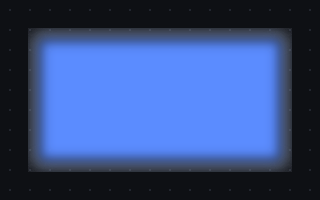
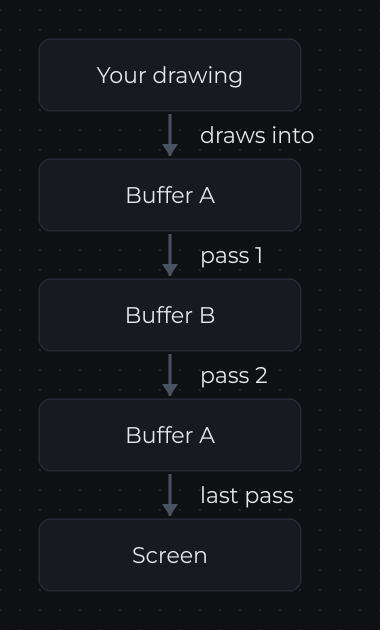
ShaderPipeline.render(x, y, width, height, drawing, passes...) works over a rectangle of your drawing coordinates, and runs the passes in the order you give them.
Without a pass, it runs the drawing as it is.
The pipeline enlarges the rectangle by the largest expansion() of its passes; what the drawing draws outside it is cut.
It renders only the part of the rectangle that the screen shows, plus the reach of the passes, the screen pixels that a pass reads around a pixel.
| Pass | Created with | Expansion |
|---|---|---|
RoundedShaderPass | create(radius, x1, y1, x2, y2), the box to round, shrunk by radius on each side | 0 |
CircleShaderPass | create(radius, centerX, centerY) | 0 |
BlurShaderPass | create(radius, horizontal): one pass blurs one direction, so a blur takes two | radius |
BorderShaderPass | create(color, width), then corners(...) and mode(...) | width + 2 |
The effects of nodes run through this pipeline (Effects).
Write a shader pass
Section titled “Write a shader pass”A pass implements IShaderPass: it binds a shader in bind and releases it in unbind.
Between the two, the pipeline draws one quad over the region, with the previous result as the texture of the draw call and texture coordinates from 0 to 1.
This fragment shader, shaders/invert/invert.fsh, inverts the result; its vertex shader is a copy of wave.vsh:
in vec2 vTexCoord;in vec4 vColor;
uniform sampler2D tex;uniform float u_Amount;
void main() {  vec4 color = texture(tex, vTexCoord) * vColor;  fragColor = vec4(mix(color.rgb, color.aaa - color.rgb, u_Amount), color.a);}
The program and the pass:
public final class InvertShader extends ShaderProgram {
  private static final InvertShader INSTANCE = new InvertShader();
  private InvertShader() {    super.load("shaders/invert/invert.vsh", "shaders/invert/invert.fsh");  }
  public static InvertShader inst() {    return InvertShader.INSTANCE;  }
  public void bind(final float amount) {    super.bind();    super.getShader().uniform("u_Amount", amount);  }
}public class InvertShaderPass implements IShaderPass {
private final float amount;
protected InvertShaderPass(final float amount) { this.amount = amount; }
public static InvertShaderPass create(final float amount) { return new InvertShaderPass(amount); }
@Override public void bind(final ShaderPassContext context) { if (InvertShader.inst().canDraw()) { InvertShader.inst().bind(this.amount); } }
@Override public void unbind() { InvertShader.inst().unbind(); }
}Full file: InvertShaderPass.java
ContainerNode.create(560, 280, 400, 240).layer((node, mouseX, mouseY) -> { DrawUtils.SHAPE.drawRect(20D, 60D, 160D, 120D, ShadersUI.MUTED); final Runnable square = () -> DrawUtils.SHAPE.drawRect(220D, 60D, 160D, 120D, ShadersUI.MUTED); ShaderPipeline.render(220D, 60D, 160D, 120D, square, InvertShaderPass.create(1F));}).attach(this);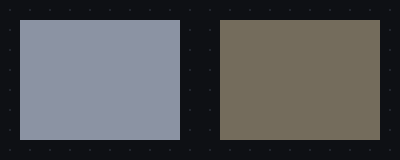
InvertShaderPass at 1F: the pass changes only how its node reaches the screen.
The pass binds only when the shader can draw: otherwise the pipeline draws the result as it is.
Override expansion() when the pass draws outside the rectangle, as a glow does, and reach(scale) when it reads pixels farther than its expansion.
ShaderPassContext gives the rectangle (getX(), getWidth()…), the enlarged region (getRegionX()…), the size of the offscreen texture in screen pixels (getTextureWidth(), getTextureHeight()) and the size of one texel (getTexelWidth(), getTexelHeight()) to sample the neighbors of a pixel.
Wrapped in an effect, a pass applies to any node: Custom effects shows how.
Build a shader at run time
Section titled “Build a shader at run time”For code built while the application runs, or for another blending, create the shader through the render bridge:
private static final String TINT = "in vec4 vColor;\n"+ "uniform vec4 u_Tint;\n"+ "void main() { fragColor = vColor * u_Tint; }";ContainerNode.create(560, 80, 200, 120).layer((node, mouseX, mouseY) -> { if (this.tint == null) { final ShaderSource vertex = ShaderSource.read(ShaderStage.VERTEX, "shaders/wave/wave.vsh"); final ShaderSource fragment = ShaderSource.from(ShaderStage.FRAGMENT, ShadersUI.TINT); this.tint = BridgeHandler.RENDER.get().createShader(vertex, fragment, BlendState.NORMAL); }
if (this.tint.isActive()) { BridgeHandler.RENDER.get().withState(render -> { this.tint.uniform("u_Tint", 0.6F, 0.6F, 0.6F, 1F).bind(); DrawUtils.SHAPE.drawRect(0D, 0D, node.w(), node.h(), Color.WHITE); this.tint.unbind(); }); }}).attach(this);
0.6F, which gives grey.
ShaderSource gives each source: ShaderSource.from(stage, code) reads a string, and ShaderSource.read(stage, handle) reads an asset; the ShaderStage says which of the two shaders it is.
createShader(vertex, fragment, blend) runs on the render thread, and isActive() tells whether the shader compiled.
Delete the shader with delete() once nothing draws with it.
- Reach for a shader when a formula colors each pixel; effects, gradients and drawing cover the rest.
- A
ShaderProgramloads a vertex and a fragment source;use(...)binds it around a drawing and restores the previous shader. - JOID GLSL reads the built-in attributes and matrices and writes
fragColor; JOID translates it for each backend. uniform(...)andsampler(...)set values by name and chain.ShaderPipelinedraws into a buffer and runs passes in their order; a pass writes premultiplied colors.createShaderbuilds a shader from sources made at run time.
Try it
Section titled “Try it”Half inverted. Show the second rectangle halfway between its color and its inverse.
Solution
InvertShaderPass.create(0.5F)mix moves halfway between the color and its inverse.
Invert after the blur. Run the invert pass on the blurred rectangle of the pipeline example, after the blur and before the border.
Solution
The passes run in the order of the call:
ShaderPipeline.render(80D, 60D, 240D, 120D, rect, blurX, blurY, InvertShaderPass.create(1F), border);