
Colors and styling
JOID imposes no look: every pixel takes the color you give it. This page shows how to create colors, derive a palette from one of them, fill shapes with gradients and keep shared colors safe.
You will learn
- How to create a color from components or from a string
- How to derive a palette from one color
- How to fill a shape with a gradient
- How to keep a palette safe from changes
- Which colors change on their own
Create a color
Section titled “Create a color”A Color is an RGBA value.
Pass it to the color(...) setter of a shape, to a TextInfo for text, or to an effect:
RectNode.create(0, 130, 1200, 130).color(ColorsUI.BAND).attach(card);RectNode.create(60, 60, 140, 140).color(Color.GRAY).attach(card);RectNode.create(260, 60, 140, 140).color(new Color(0.2F, 0.4F, 0.8F)).attach(card);RectNode.create(460, 60, 140, 140).color(new Color(230, 120, 50)).attach(card);RectNode.create(660, 60, 140, 140).color(Color.decode("#55AA55")).attach(card);RectNode.create(860, 60, 140, 140).color(Color.decode("rgba(51, 102, 204, 0.5)")).attach(card);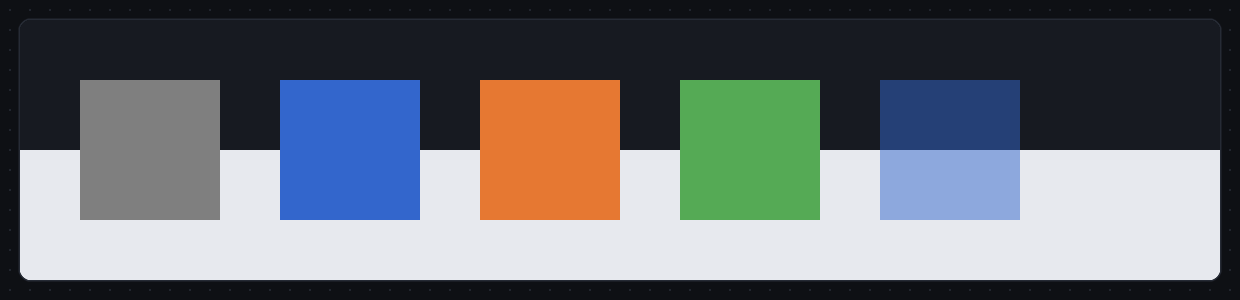
Color: pick the one that matches the value you copy.
There are four ways to build a color:
- a preset such as
Color.WHITE,Color.GRAYorColor.TRANSPARENT; - float components from
0Fto1F:new Color(0.2F, 0.4F, 0.8F), with an optional alpha as a fourth argument; - integer components from
0to255:new Color(230, 120, 50), with an optional alpha from0to255; - a string read by
Color.decode:"#RRGGBB","#RRGGBBAA","rgb(r, g, b)", or"rgba(r, g, b, a)"with an alpha from0to1.
Color.decode is the shortest way to copy a color from a design tool, and throws a NumberFormatException on a string it cannot read.
Color.rgb and Color.argb read a packed int such as 0x3366CC, and Color.encode writes #RRGGBBAA back.
The constructor picks its scale from the type of its arguments: new Color(1, 0, 0) is a nearly black red (1 out of 255), new Color(1F, 0F, 0F) a full red.
Derive a palette from one color
Section titled “Derive a palette from one color”darker, brighter, withAlpha and to return a new color and leave the original as it is, so one base color gives a consistent palette:
RectNode.create(0, 130, 1200, 130).color(ColorsUI.BAND).attach(card);RectNode.create(60, 60, 140, 140).color(ColorsUI.BRAND).attach(card);RectNode.create(240, 60, 140, 140).color(ColorsUI.BRAND.darker()).attach(card);RectNode.create(420, 60, 140, 140).color(ColorsUI.BRAND.darker(0.25F)).attach(card);RectNode.create(600, 60, 140, 140).color(ColorsUI.BRAND.brighter(0.6F)).attach(card);RectNode.create(780, 60, 140, 140).color(ColorsUI.BRAND.withAlpha(0.5F)).attach(card);RectNode.create(960, 60, 140, 140).color(ColorsUI.BRAND.to(Color.WHITE, 0.5F)).attach(card);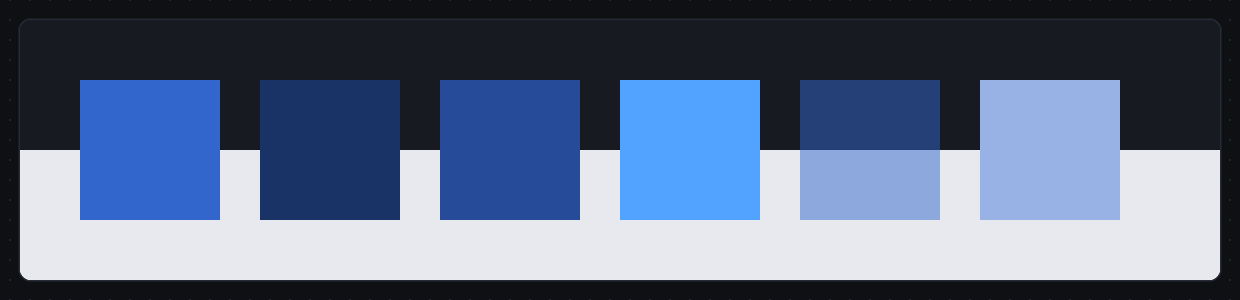
darker(scale)multiplies the red, green and blue components by1 - scale(0.5Fwithout argument).brighter(scale)multiplies them by1 + scale(0.2Fwithout argument); a component never goes above1F.withAlpha(alpha)keeps the color and replaces its opacity;withRed,withGreenandwithBluereplace one component.to(target, progress)blends towardtarget:0Fgives the color itself,1Fthe target,0.5Fthe middle.
multiply, add and scale combine colors component by component.
Fill with a gradient
Section titled “Fill with a gradient”Color.toGradient turns a color into a linear gradient from that color to another.
A gradient is a Color too, so it goes where a color goes: fills, borders, text and image tints.
RectNode.create(0, 130, 1200, 130).color(ColorsUI.BAND).attach(card);final Point top = Point.of(0D, 0D);final Point bottom = Point.of(0D, 1D);final Point corner = Point.of(1D, 1D);final Color clear = ColorsUI.BRAND.withAlpha(0F);RectNode.create(60, 60, 240, 140).color(ColorsUI.BRAND.toGradient(Color.WHITE)).attach(card);RectNode.create(340, 60, 240, 140).color(ColorsUI.BRAND.toGradient(Color.WHITE, top, bottom)).attach(card);RectNode.create(620, 60, 240, 140).color(ColorsUI.BRAND.toGradient(Color.WHITE, top, corner)).attach(card);RectNode.create(900, 60, 240, 140).color(ColorsUI.BRAND.toGradient(clear)).attach(card);
Without points, the gradient goes from the left edge to the right edge.
Two Point values set another direction, in fractions of the drawn shape: Point.of(0D, 0D) is the top-left corner and Point.of(0D, 1D) the bottom-left one.
Color.decode reads gradients as well: "gradient(#3366CC, #FFFFFF)", with four optional numbers after the colors for the two points.
Fading to the same color with an alpha of 0 keeps the hue; Color.TRANSPARENT is a transparent black, which greys the middle of the gradient.
Keep a palette safe
Section titled “Keep a palette safe”A color that you create with new can change in place: red(...), green(...), blue(...) and alpha(...) modify it, and every node that uses it shows the change at its next frame.
LockableValue.lock freezes a color, so that a palette shared by your UIs never changes by accident:
private static final Color BRAND = Color.decode("#3366CC").lock();A locked color refuses alpha(...) and the other changes with an IllegalStateException that names the copy to use, such as withAlpha(...).
The presets of Color are locked, and Color.copy gives an unlocked copy of any color.
The color of a node can also follow the state of your UI: give color(...) an expression that reads a signal, or a lambda (Signals).
A second color for the hovered state is set with hoveredColor(...) (Hover, tooltips and cursors).
Use the colors that change on their own
Section titled “Use the colors that change on their own”Two presets change with the clock of JOID:
Color.RAINBOWcycles through the hues every 3 s;Color.LOADINGpulses slowly between two dark greys, for loading placeholders (Rebuilding the tree).
A color derived from them changes with them: Color.RAINBOW.darker() is a darker rainbow, and Color.LOADING.withAlpha(0.5F) a half-transparent pulse.
RectNode.create(60, 60, 160, 160).color(Color.RAINBOW).attach(card);RectNode.create(260, 60, 160, 160).color(Color.RAINBOW.darker()).attach(card);RectNode.create(460, 60, 280, 160).color(Color.LOADING).attach(card);Color.RAINBOW() and Color.LOADING() return the shade of this instant, as a color that stays put.
- Build a
Colorfrom a preset, float components (0Fto1F), integer components (0to255) orColor.decode. - Derive a palette with
darker,brighter,withAlphaandto: each call returns a new color. - A gradient from
toGradientis a color, with a direction given by two points in fractions of the shape. lock()your shared colors: a locked color refuses in-place changes, as the presets do.RAINBOWandLOADINGchange on their own, and so do the colors derived from them.
Try it
Section titled “Try it”Fade a card out.
Fill a card with #3366CC at the top, fading to transparent at the bottom.
Solution
final Color blue = Color.decode("#3366CC");final Color fade = blue.toGradient(blue.withAlpha(0F), Point.of(0D, 0D), Point.of(0D, 1D));RectNode.create(0, 0, 300, 200).color(fade).attach(this);Darken on hover. Make a button 25 % darker while the mouse is over it, without writing the darker color by hand.
Solution
RectNode.create(0, 0, 200, 60).color(ColorsUI.BRAND).hoveredColor(ColorsUI.BRAND.darker(0.25F)).attach(this);