
The bridges
The core of JOID never calls a window, graphics or audio library.
Each thing it needs from the outside is an interface, called a bridge, and each bridge lives in a registry of BridgeHandler.
A backend fills the registries; the core reads them.
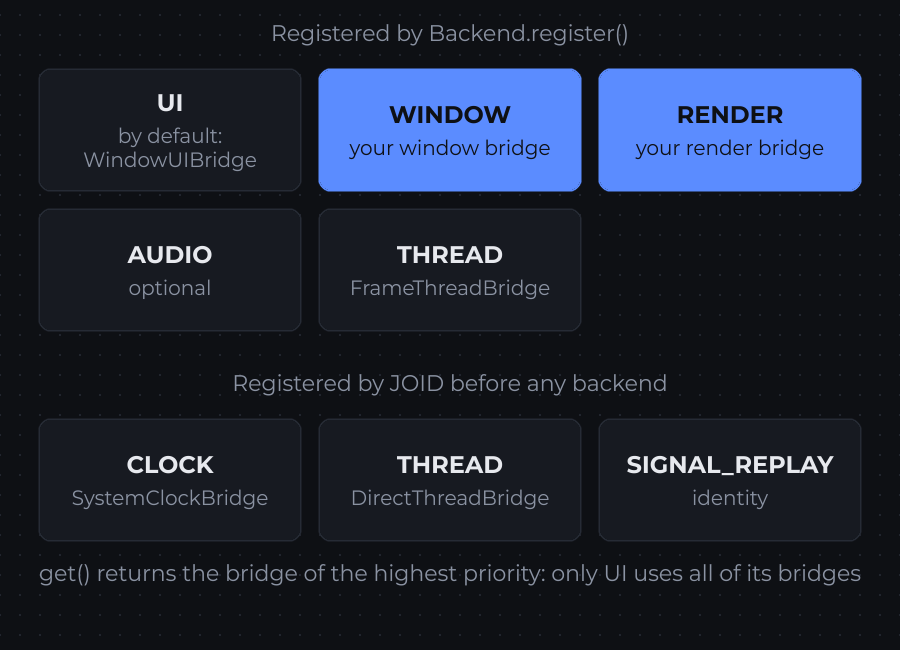
The registries
Section titled “The registries”| Registry | Bridge | Filled by | Contract |
|---|---|---|---|
BridgeHandler.UI | UIBridge | the backend (a default WindowUIBridge), the application, plugins | UI bridge |
BridgeHandler.WINDOW | IWindowBridge | the backend | Window bridge |
BridgeHandler.RENDER | IRenderBridge | the backend | Render bridge |
BridgeHandler.AUDIO | IAudioBridge | the backend, optional | Audio bridge |
BridgeHandler.THREAD | IThreadBridge | JOID (DirectThreadBridge), then the backend (FrameThreadBridge by default) | Thread bridge |
BridgeHandler.CLOCK | IClockBridge | JOID (SystemClockBridge), tests | Clock bridge |
BridgeHandler.SIGNAL_REPLAY | ISignalReplayBridge | JOID (an identity), a host that renames classes | Signal replay bridge |
Every bridge interface extends the empty marker IBridge.
BridgeHandler.UI is a UIBridgeRegistry: a BridgeRegistry that also runs the frames and dispatches the input.
Priorities order a registry
Section titled “Priorities order a registry”A registry keeps its bridges sorted by an int priority, and BridgeRegistry.get returns the bridge of the highest one.
register(bridge) uses the priority 0; BridgeRegistry.registerDefault registers a bridge with the lowest priority, and only while the registry is empty.
Add a UI bridge of your own gives the rules from the side of an application.
Registering and unregistering are thread-safe, and reading never locks: each change publishes a new immutable list.
get() on an empty registry throws an IllegalStateException that names the registry, which is the usual sign that the backend was never registered.
Who registers what, and when
Section titled “Who registers what, and when”The registries are static, and the core puts three bridges in them before any backend: the system clock, the direct thread bridge and the identity replay bridge.
A backend registers the rest from Backend.register, one hook per bridge, then its defaults (Writing a backend lists the hooks).
What happens at register() gives the whole sequence from the side of an application.
Application code and plugins add to the registries at any time.
Code that must run after the backend, whatever the load order, goes into JOID.onReady (Run code once JOID is ready).
Only the UI registry combines its bridges
Section titled “Only the UI registry combines its bridges”The core reads WINDOW, RENDER, AUDIO, THREAD, CLOCK and SIGNAL_REPLAY with get(): the highest bridge wins, the others wait below it.
A test, for example, registers a ManualClockBridge above the system clock.
The UI registry uses all of its bridges at once, for the frames, the input and the opening of a UI. Add a UI bridge of your own gives that routing, and UI bridge the contract of a bridge.